
腾讯地图javascript API实现地图模糊搜索标记,经纬度输入及点击双向定位
·
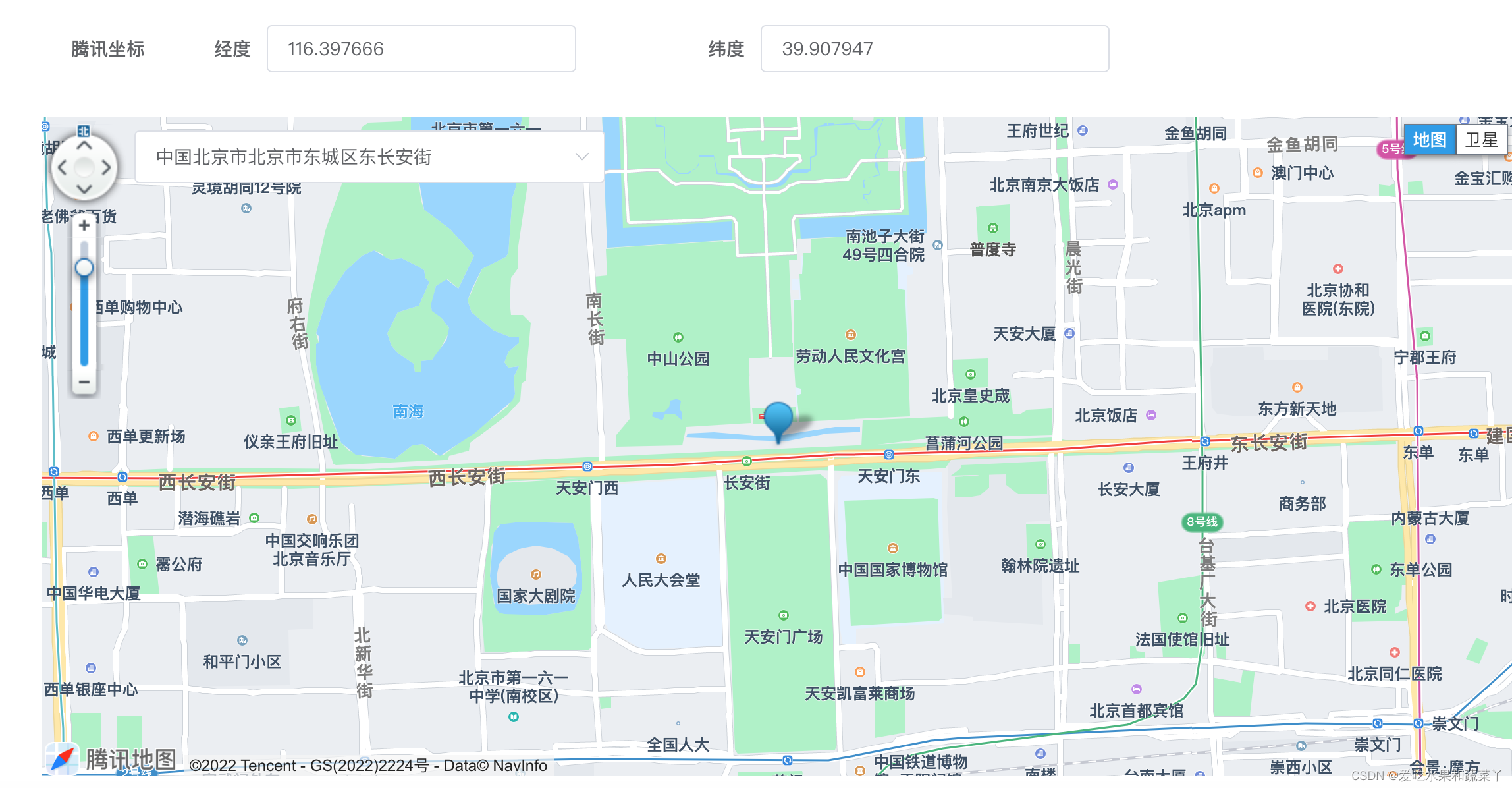
// 模板部分
<el-row>
        <el-col :span="1">
          <el-form-item
            label="腾讯坐标"
          />
        </el-col>
        <el-col :span="8">
          <el-form-item
            label="经度"
            prop="longitude"
            style="margin-left: 30px"
          >
            <el-input
              v-model="showForm.longitude"
              @input="creatMapPoint('long')"
            />
            <p class="longClass">{{ longWarn }}</p>
          </el-form-item>
        </el-col>
        <el-col :span="8">
          <el-form-item label="纬度" prop="latitude">
            <el-input
              v-model="showForm.latitude"
              @input="creatMapPoint('lat')"
            />
            <p class="longClass">{{ latWarn }}</p>
          </el-form-item>
        </el-col>
      </el-row>
// script部分
 data() {
    return {
	  imgurl: require('../../../../images/position.png'),
      showForm: {
        longitude: 116.397666,
        latitude: 39.907947
      },
      longWarn: '',
      latWarn: '',
      marker: null,
      markers: [],
      regionName: '',
      searchService: [],
      map: {},
      geocoder: null,
      adressList: [],
      mapAdress: '北京市建国路天安门',
    }
}

methods: {
// 初始化腾讯地图
    TencentMap() {
      const that = this
      TMap('腾讯地图key').then((qq) => {
        that.map = new qq.maps.Map(document.getElementById('tenXMap'), {
          center: new qq.maps.LatLng(Number(this.showForm.latitude), Number(this.showForm.longitude)), // 设置地图中心点坐标
          zoom: 15 // 设置地图缩放级别
        })
        that.marker = new qq.maps.Marker({
          position: new qq.maps.LatLng(Number(this.showForm.latitude), Number(this.showForm.longitude)),
          map: that.map
        })
        var latlngBounds = new qq.maps.LatLngBounds()
        var keyword = ''
        // 设置Poi检索服务,用于本地检索、周边检索
        this.searchService = new qq.maps.SearchService({
        // 设置搜索范围为北京
          location: that.regionName || '北京',
          // 设置搜索页码为1
          pageIndex: 1,
          // 设置每页的结果数为5
          pageCapacity: 10,
          // 设置展现查询结构到infoDIV上
          // panel: this.mapAdress,
          // 设置动扩大检索区域。默认值true,会自动检索指定城市以外区域。
          autoExtend: true,
          // 检索成功的回调函数
          complete: function(results) {
            // 设置回调函数参数
            if (results.type === 'CITY_LIST') {
              that.searchService.setLocation(results.detail.cities[0].cityName)
              that.searchService.search(keyword)
              return
            }
            // 设置回调函数参数
            const pois = results.detail.pois
            for (var i = 0, l = pois.length; i < l; i++) {
              var poi = pois[i]
              // 扩展边界范围,用来包含搜索到的Poi点
              latlngBounds.extend(poi.latLng)
              var marker = new qq.maps.Marker({
                map: that.map,
                animation: qq.maps.MarkerAnimation.DROP,
                position: poi.latLng
              })
              marker.setTitle(i + 1)

              that.markers.push(marker)
            }
            that.adressList = results.detail.pois
            // 调整地图视野
            that.map.fitBounds(latlngBounds)
          },
          // 若服务请求失败,则运行以下函数
          error: function(e) {
            console.log('出错了', e)
          }
        })
        qq.maps.event.addListener(that.map, 'click', function(e) {
          if (!that.marker) {
            that.marker = new qq.maps.Marker({
              position: e.latLng,
              animation: qq.maps.MarkerAnimation.DROP,
              map: that.map
            })
            return
          }
          that.marker.setPosition(e.latLng)
          that.showForm.latitude = e.latLng.getLat().toFixed(6)
          that.showForm.longitude = e.latLng.getLng().toFixed(6)
          that.convert(that.showForm.latitude, that.showForm.longitude)
        })
      })
    },
     // 模糊查询  searchPosition
    searchPositionHandle(keyword) {
      this.clearOverlays(this.markers)
      if (this.provinceName !== '') {
        if (this.provinceName === '北京' || this.provinceName === '天津' || this.provinceName === '上海' || this.provinceName === '重庆') {
          this.regionName = this.provinceName
        } else {
          if (this.cityName !== '') {
            this.regionName = this.provinceName + this.cityName
          } else {
            this.regionName = this.provinceName
          }
        }
      } else {
        this.regionName = '北京'
      }
      this.searchService.search(keyword)
      this.searchService.setLocation(this.regionName)
    },
     // 清除地图上的marker
    clearOverlays(overlays) {
      let overlay
      // eslint-disable-next-line no-cond-assign
      while (overlay = overlays.pop()) {
        overlay.setMap(null)
      }
    },
    // 赋值地址给输入框
    convert(Lat, Lng) {
      const that = this
      that.geocoder = new window.qq.maps.Geocoder({
        complete: function(result) {
          that.mapAdress = result.detail.address
        }
      })
      const coord = new window.qq.maps.LatLng(Lat, Lng)
      that.geocoder.getAddress(coord)
    },
     creatMapPoint(info) {
      const longitude = Number(this.showForm.longitude)
      const latitude = Number(this.showForm.latitude)
      const reg = /^(?!0+(?:\.0+)?$)(?:[1-9]\d*|0)(?:\.\d{1,6})?$/
      if (info === 'long') {
        if (!reg.test(longitude)) {
          this.longWarn = '经度必须为数字,最多保留6位小数'
          return false
        } else if (longitude > 180 || longitude < 0) {
          this.longWarn = '请输入正确的经度'
          return false
        } else {
          this.longWarn = ''
        }
      } else if (info === 'lat') {
        if (!reg.test(latitude)) {
          this.latWarn = '纬度必须为数字,最多保留6位小数'
          return false
        } else if (latitude > 90 || latitude < 0) {
          this.latWarn = '请输入正确的纬度'
          return false
        } else {
          this.latWarn = ''
        }
      }
      if (!this.marker) {
        this.marker = new window.qq.maps.Marker({
          position: new window.qq.maps.LatLng(Number(this.showForm.latitude), Number(this.showForm.longitude)),
          animation: window.qq.maps.MarkerAnimation.DROP,
          map: this.map
        })
        return
      }
      this.marker.setPosition(new window.qq.maps.LatLng(Number(this.showForm.latitude), Number(this.showForm.longitude)))
      this.convert(Number(this.showForm.latitude), Number(this.showForm.longitude))
    },
     // 输入地址定位
    adressHandle(positin) {
      this.showForm.latitude = positin.lat.toFixed(6)
      this.showForm.longitude = positin.lng.toFixed(6)
      if (!this.marker) {
        this.marker = new window.qq.maps.Marker({
          position: new window.qq.maps.LatLng(Number(positin.lat), Number(positin.lng)),
          animation: window.qq.maps.MarkerAnimation.DROP,
          map: this.map
        })
        return
      }
      this.clearOverlays(this.markers)
      this.marker.setPosition(new window.qq.maps.LatLng(Number(positin.lat), Number(positin.lng)))
      // 调整视野
      const latlngBounds = new window.qq.maps.LatLngBounds()
      latlngBounds.extend(new window.qq.maps.LatLng(Number(positin.lat), Number(positin.lng)))
      this.map.fitBounds(latlngBounds)
    }
}

// css部分
.tenXMap{
    width: 92%;
    margin-left: 50px;
    position: relative;
    height: 500px;
    .tenXAdress{
      width: 60%;
      position: absolute;
      top: 10px;
      left: 70px;
      z-index: 1002;
    }
}
更多推荐



 1
1 0
0- 0


 已为社区贡献1条内容

所有评论(0)