
ElasticSearch 7.14-分布式搜索引擎--了解安装
- 全文检索
- 简介
- 安装
- kibana
- 核心概念 索引 映射 文档
- 高级查询 Query DSL
- 索引原理
- 分词器
- 过滤查询
- 聚合查询
全文检索
全文检索是怎么回事呢?其实就好比我们在字典里查字,计算机程序会把文章里的每一个词都仔细看一遍,然后给每个词做一个标记,记录下这个词在文章里出现了几次,都在哪些地方。当你想要查找某个信息的时候,计算机就会根据之前做好的这些标记来帮你找到相关的文章。
具体来说,建立索引的时候,就是把文本拆分成一个个的词,看看这些词在文章里有没有出现,出现了多少次。而检索的时候呢,你输入一个关键词,计算机就会在索引里找,把符合条件的文章都找出来,还会按照相关度给这些文章排个顺序。
全文检索主要是以文本作为查找的对象,目标就是找出那些包含了你指定词汇的文本。衡量一个全文检索系统好不好,就看它是不是全面、准确,找东西快不快。
需要注意的是,全文检索只处理文字本身,不关心文字背后的意思。而且在搜索的时候,英文是不区分大小写的。最后,找出来的结果会按照相关度排好顺序
索: 建立索引 文本---->切分 —> 词 文章出现过 出现多少次
检索: 查询 关键词—> 索引中–> 符合条件文章 相关度排序
全文检索(Full-Text Retrieval)以文本作为检索对象,找出含有指定词汇的文本。全面、准确和快速是衡量全文检索系统的关键指标。
只处理文本、不处理语义搜索时英文不区分大小写结果列表有相关度排序
简介
什么是ElasticSearch
ElasticSearch 一般简称 ES,它是基于 Apache Lucene 构建的一个开源搜索引擎,现在很多企业都在用它,特别流行。Lucene 本身可以说是目前性能最好的开源搜索引擎工具包了,但是它的 API 太复杂了,要想用好它,得对搜索理论有很深的了解,所以很难把它集成到实际的应用中。
ES 是用 Java 语言写的,它提供了简单易用的 RestFul API。开发者只要用这个 API,就能开发出相关的搜索功能,这样就不用去面对 Lucene 的那些复杂问题了。
ElasticSearch诞生
很多年前,有个叫 Shay Banon 的人,他刚结婚不久,但是失业了。因为他的妻子要去伦敦学厨师,所以他也跟着去了。在找工作的过程中,他想给妻子做一个食谱的搜索引擎,于是就开始搞一个早期版本的 Lucene。
直接用 Lucene 来做这个搜索引擎挺困难的,所以 Shay 就开始对 Lucene 的代码进行简化和整理,让 Java 程序员能够更方便地在自己的应用里添加搜索功能。他把这个成果发布出来,叫做 “Compass”。
后来 Shay 找到了一份工作,这份工作的环境是高性能和内存数据网格的分布式环境,在这种环境下,当然就需要一个高性能、实时的、分布式的搜索引擎了。于是他决定重新写 Compass 库,把它变成一个独立的服务,这个服务就是 Elasticsearch。
Elasticsearch 的第一个公开版本是在 2010 年 2 月发布的。从那以后,Elasticsearch 就成了 Github 上特别受欢迎的项目之一,有超过 300 人给它贡献代码。后来还成立了一家专门做 Elasticsearch 的公司,他们一边给用户提供商业支持,一边开发新的功能。不过,Elasticsearch 永远都是开源的,所有人都可以用。
现在国内的大厂,像阿里、腾讯、京东、美团等等,几乎都在用 Elasticsearch。
安装
- 传统方式安装 下载安装包—> 平台 window macos linux(ubuntu)
- Docker 方式安装 推荐
传统方式安装
0.环境准备
- centos7.x+、ubuntu、windows、macos
- 安装jdk11.0+ 并配置环境变量 jdk8
1.下载ES
- https://www.elastic.co/cn/start
2.安装ES不用使用root用户,创建普通用户
# 添加用户名
$ useradd chenyn
# 修改密码
$ passwd chenyn
# 普通用户登录
3.解压缩ES安装包
$ tar -zxvf elasticsearch-7.14.0-linux-x86_64.tar.gz
$ ll
总用量 650168
drwxr-xr-x. 10 chenyn chenyn       167 8月  16 11:07 elasticsearch-7.14.0
4.查看ES解压包中目录结构
[chenyn@localhost elasticsearch-7.14.0]$ ll
- bin 		启动ES服务脚本目录
- config  ES配置文件的目录
- data    ES的数据存放目录
- jdk     ES提供需要指定的jdk目录
- lib     ES依赖第三方库的目录
- logs    ES的日志目录
- modules 模块的目录
- plugins 插件目录
5.启动ES服务
[chenyn@localhost ~]$ ./elasticsearch-7.14.0/bin/elasticsearch

- 这个错误时系统jdk版本与es要求jdk版本不一致,es默认需要jdk11以上版本,当前系统使用的jdk8,需要从新安装jdk11才行!
- 解决方案:
	1.安装jdk11+ 配置环境变量、
	2.ES包中jdk目录就是es需要jdk,只需要将这个目录配置到ES_JAVA_HOME环境变即可、
6.配置环境变量
```shell
$ vim /etc/profile
- export ES_JAVA_HOME=指定为ES安装目录中jdk目录
- source /etc/profile
7.从新启动ES服务
$ vim /etc/profile
- export ES_JAVA_HOME=指定为 ES 安装目录中 jdk 目录
- source /etc/profile
8.ES启动默认监听9200端口,访问9200
$ curl http://localhost:9200
9.开启远程访问
默认情况下,ES 是不能用主机 IP 进行远程连接的,如果你想开启远程访问权限,就得修改 ES 安装包中 config/elasticsearch.yml 这个配置文件:
1.默认ES无法使用主机ip进行远程连接,需要开启远程连接权限
- 修改ES安装包中config/elasticsearch.yml配置文件

$ vim elasticsearch.yml
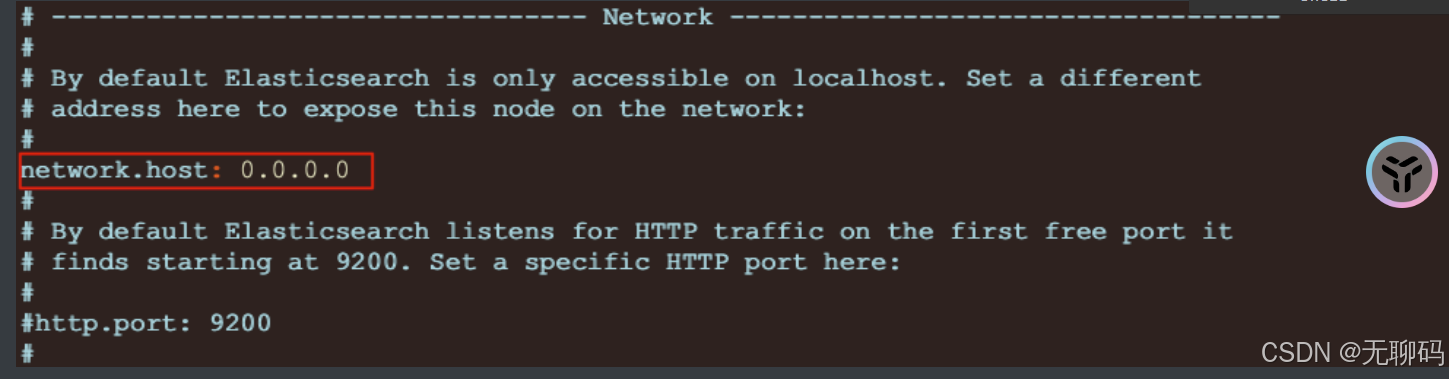
- 修改ES安装包中config/elasticsearch.yml配置文件
2.重新启动ES服务
- ./elasticsearch
- 启动出现如下错误:
	`bootstrap check failure [1] of [4]: max file descriptors [4096] for elasticsearch process is too low, increase to at least [65535]
	`bootstrap check failure [2] of [4]: max number of threads [3802] for user [chenyn] is too low, increase to at least [4096]
	`bootstrap check failure [3] of [4]: max virtual memory areas vm.max_map_count [65530] is too low, increase to at least [262144]
	`bootstrap check failure [4] of [4]: the default discovery settings are unsuitable for production use; at least one of [discovery.seed_hosts, discovery.seed_providers
3.解决错误-1

$ vim /etc/security/limits.conf

# 在最后面追加下面内容
*               soft    nofile          65536
*               hard    nofile          65536
*               soft    nproc           4096
*               hard    nproc           4096
# 退出重新登录检测配置是否生效:
ulimit -Hn
ulimit -Sn
ulimit -Hu
ulimit -Su
3.解决错误-2

#进入limits.d目录下修改配置文件。
$ vim /etc/security/limits.d/20-nproc.conf
 修改为
启动ES用户名 soft nproc 4096
#3.解决错误-3

 编辑sysctl.conf文件
$ vim /etc/sysctl.conf
vm.max_map_count=655360 #centos7 系统
vm.max_map_count=262144 #ubuntu 系统
执行以下命令生效:
$ sysctl -p
3.解决错误-4
 编辑elasticsearch.yml配置文件
$ vim conf/elasticsearch.yml
cluster.initial_master_nodes: ["node-1"]
# 4.重启启动ES服务,并通过浏览器访问
{
  "name": "localhost.localdomain",
  "cluster_name": "elasticsearch",
  "cluster_uuid": "OWh3xLYwR-6lZ_fQNhVY3A",
  "version": {
    "number": "7.14.0",
    "build_flavor": "default",
    "build_type": "tar",
    "build_hash": "dd5a0a2acaa2045ff9624f3729fc8a6f40835aa1",
    "build_date": "2021-07-29T20:49:32.864135063Z",
    "build_snapshot": false,
    "lucene_version": "8.9.0",
    "minimum_wire_compatibility_version": "6.8.0",
    "minimum_index_compatibility_version": "6.0.0-beta1"
  },
  "tagline": "You Know, for Search"
}
# Kibana
`Kibana Navicat`是一个针对`Elasticsearch mysql`的`开源分析及可视化平台`,使用Kibana可以`查询、查看并与存储在ES索引的数据进行交互操作`,使用Kibana能执行高级的`数据分析,并能以图表、表格和地图的形式查看数据。
安装
传统方式安装
# 1. 下载Kibana
- https://www.elastic.co/downloads/kibana

# 2. 安装下载的kibana
- $ tar -zxvf kibana-7.14.0-linux-x86_64.tar.gz

# 3. 编辑kibana配置文件
- $ vim /Kibana 安装目录中 config 目录/kibana/kibana.yml

# 4. 修改如下配置
- server.host: "0.0.0.0"                		# 开启kibana远程访问
- elasticsearch.hosts: ["http://localhost:9200"]   #ES服务器地址

# 5. 启动kibana
- ./bin/kibana

# 6. 访问kibana的web界面
- http://10.15.0.5:5601/   #kibana默认端口为5601
Docker方式安装
# 1.获取镜像
- docker pull kibana:7.14.0

# 2.运行kibana
- docker run -d  --name kibana -p 5601:5601 kibana:7.14.0

# 3.进入容器连接到ES,重启kibana容器,访问
- http://10.15.0.3:5601

# 4.基于数据卷加载配置文件方式运行
- a.从容器复制kibana配置文件出来
- b.修改配置文件为对应ES服务器地址
- c.通过数据卷加载配置文件方式启动
  `docker run -d -v /root/kibana.yml:/usr/share/kibana/config/kibana.yml  --name kibana -p 5601:5601 kibana:7.14.0
compose方式安装
version: "3.8"
volumes:
  data:
  config:
  plugin:
networks:
  es:
services:
  elasticsearch:
    image: elasticsearch:7.14.0
    ports:
      - "9200:9200"
      - "9300:9300"
    networks:
      - "es"
    environment:
      - "discovery.type=single-node"
      - "ES_JAVA_OPTS=-Xms512m -Xmx512m"
    volumes:
      - data:/usr/share/elasticsearch/data
      - config:/usr/share/elasticsearch/config
      - plugin:/usr/share/elasticsearch/plugins

  kibana:
    image: kibana:7.14.0
    ports:
      - "5601:5601"
    networks:
      - "es"
    volumes:
      - ./kibana.yml:/usr/share/kibana/config/kibana.yml
# kibana配置文件 连接到ES
server.host: "0"
server.shutdownTimeout: "5s"
elasticsearch.hosts: [ "http://elasticsearch:9200" ]
monitoring.ui.container.elasticsearch.enabled: true
核心概念
索引
一个索引就是一个拥有几分相似特征的文档的集合。比如说,你可以有一个商品数据的索引,一个订单数据的索引,还有一个用户数据的索引。一个索引由一个名字来标识(必须全部是小写字母的)**,**并且当我们要对这个索引中的文档进行索引、搜索、更新和删除的时候,都要使用到这个名字。
映射
映射是定义一个文档和它所包含的字段如何被存储和索引的过程。在默认配置下,ES可以根据插入的数据自动地创建mapping,也可以手动创建mapping。 mapping中主要包括字段名、字段类型等
文档
文档是索引中存储的一条条数据。一条文档是一个可被索引的最小单元。ES中的文档采用了轻量级的JSON格式数据来表示。
基本操作
索引
创建
# 1.创建索引
- PUT /索引名 ====> PUT /products
- 注意:
		1.ES中索引健康转态  red(索引不可用) 、yellwo(索引可用,存在风险)、green(健康)
		2.默认ES在创建索引时回为索引创建1个备份索引和一个primary索引

# 2.创建索引 进行索引分片配置
- PUT /products
{
  "settings": {
    "number_of_shards": 1, #指定主分片的数量
    "number_of_replicas": 0 #指定副本分片的数量
  }
}
查询
# 查询索引
- GET /_cat/indices?v
删除
# 3.删除索引
- DELETE /索引名 =====> DELETE /products
- DELETE /*     `*代表通配符,代表所有索引`
映射
创建
字符串类型: keyword 关键字 关键词 、text 一段文本
数字类型:integer long
小数类型:float double
布尔类型:boolean
日期类型:date
# 1.创建索引&映射
PUT /products
{
  "settings": {
    "number_of_shards": 1,
    "number_of_replicas": 0
  },
  "mappings": {
    "properties": {
      "title":{
        "type": "keyword"
      },
      "price":{
        "type": "double"
      },
      "created_at":{
        "type": "date"
      },
      "description":{
        "type": "text"
      }
    }
  }
}
# 说明: ES中支持字段类型非常丰富,如:text、keyword、integer、long、ip
查询
# 1.查看某个索引的映射
- GET /索引名/_mapping =====> GET /products/_mapping
文档
添加文档
POST /products/_doc/1 #指定文档id
{
  "title":"iphone13",
  "price":8999.99,
  "created_at":"2021-09-15",
  "description":"iPhone 13屏幕采用6.1英寸OLED屏幕。"
}
-------------------------------------
POST /products/_doc/ #自动生成文档id
{
  "title":"iphone14",
  "price":8999.99,
  "created_at":"2021-09-15",
  "description":"iPhone 13屏幕采用6.8英寸OLED屏幕"
}
-------------------------------------
{
  "_index" : "products",
  "_type" : "_doc",
  "_id" : "sjfYnXwBVVbJgt24PlVU",
  "_version" : 1,
  "result" : "created",
  "_shards" : {
    "total" : 1,
    "successful" : 1,
    "failed" : 0
  },
  "_seq_no" : 3,
  "_primary_term" : 1
}
查询文档
# GET /****/_doc/***
{
  "_index" : "products",
  "_type" : "_doc",
  "_id" : "1",
  "_version" : 1,
  "_seq_no" : 0,
  "_primary_term" : 1,
  "found" : true,
  "_source" : {
    "title" : "iphone13",
    "price" : 8999.99,
    "created_at" : "2021-09-15",
    "description" : "iPhone 13屏幕采用6.1英寸OLED屏幕"
  }
}
删除文档
DELETE /****/_doc/****
{
  "_index" : "products",
  "_type" : "_doc",
  "_id" : "1",
  "_version" : 2,
  "result" : "deleted",
  "_shards" : {
    "total" : 1,
    "successful" : 1,
    "failed" : 0
  },
  "_seq_no" : 2,
  "_primary_term" : 1
}
更新文档
PUT /products/_doc/sjfYnXwBVVbJgt24PlVU
{
  "title":"iphon15"
}
--  说明: 这种更新方式是先删除原始文档,在将更新文档以新的内容插入。

POST /products/_doc/sjfYnXwBVVbJgt24PlVU/_update
{
    "doc" : {
        "title" : "iphon15"
    }
}
-- 说明: 这种方式可以将数据原始内容保存,并在此基础上更新
批量操作
POST /products/_doc/_bulk #批量索引两条文档
{"index":{
"_id":"1"
}}
{"title":"iphone14","price":8999.99,"created_at":"2021-09-15","description":"iPhone 13屏幕采用6.8英寸OLED屏幕"}
	{"index":{"_id":"2"}}
	  		{"title":"iphone15","price":8999.99,"created_at":"2021-09-15","description":"iPhone 15屏幕采用10.8英寸OLED屏幕"}
-- POST /products/_doc/_bulk #更新文档同时删除文档
	{"update":{"_id":"1"}}
		{"doc":{"title":"iphone17"}}
	{"delete":{"_id":2}}
	{"index":{}}
		{"title":"iphone19","price":8999.99,"created_at":"2021-09-15","description":"iPhone 19屏幕采用61.8英寸OLED屏幕"}
-- 说明:批量时不会因为一个失败而全部失败,而是继续执行后续操作,在返回时按照执行的状态返回!
高级查询
说明
ES中提供了一种强大的检索数据方式,这种检索方式称之为Query DSL ,Query DSL是利用Rest API传递JSON格式的请求体(Request Body)数据与ES进行交互,这种方式的丰富查询语法让ES检索变得更强大,更简洁。
语法
# GET /索引名/_doc/_search {json格式请求体数据}
# GET /索引名/_search {json格式请求体数据}
-- 测试数据
# 1.创建索引 映射
PUT /products/
{
  "mappings": {
    "properties": {
      "title":{
        "type": "keyword"
      },
      "price":{
        "type": "double"
      },
      "created_at":{
        "type":"date"
      },
      "description":{
        "type":"text"
      }
    }
  }
}
# 2.测试数据
PUT /products/_doc/_bulk
{"index":{}}
  {"title":"iphone12 pro","price":8999,"created_at":"2020-10-23","description":"iPhone 12 Pro采用超瓷晶面板和亚光质感玻璃背板,搭配不锈钢边框,有银色、石墨色、金色、海蓝色四种颜色。宽度:71.5毫米,高度:146.7毫米,厚度:7.4毫米,重量:187克"}
{"index":{}}
  {"title":"iphone12","price":4999,"created_at":"2020-10-23","description":"iPhone 12 高度:146.7毫米;宽度:71.5毫米;厚度:7.4毫米;重量:162克(5.73盎司) [5]  。iPhone 12设计采用了离子玻璃,以及7000系列铝金属外壳。"}
{"index":{}}
  {"title":"iphone13","price":6000,"created_at":"2021-09-15","description":"iPhone 13屏幕采用6.1英寸OLED屏幕;高度约146.7毫米,宽度约71.5毫米,厚度约7.65毫米,重量约173克。"}
{"index":{}}
  {"title":"iphone13 pro","price":8999,"created_at":"2021-09-15","description":"iPhone 13Pro搭载A15 Bionic芯片,拥有四种配色,支持5G。有128G、256G、512G、1T可选,售价为999美元起。"}
# 1.创建索引 映射
PUT /products/
{
  "mappings": {
    "properties": {
      "title":{
        "type": "keyword"
      },
      "price":{
        "type": "double"
      },
      "created_at":{
        "type":"date"
      },
      "description":{
        "type":"text"
      }
    }
  }
}
# 2.测试数据
PUT /products/_doc/_bulk
{"index":{}}
  {"title":"iphone12 pro","price":8999,"created_at":"2020-10-23","description":"iPhone 12 Pro采用超瓷晶面板和亚光质感玻璃背板,搭配不锈钢边框,有银色、石墨色、金色、海蓝色四种颜色。宽度:71.5毫米,高度:146.7毫米,厚度:7.4毫米,重量:187克"}
{"index":{}}
  {"title":"iphone12","price":4999,"created_at":"2020-10-23","description":"iPhone 12 高度:146.7毫米;宽度:71.5毫米;厚度:7.4毫米;重量:162克(5.73盎司) [5]  。iPhone 12设计采用了离子玻璃,以及7000系列铝金属外壳。"}
{"index":{}}
  {"title":"iphone13","price":6000,"created_at":"2021-09-15","description":"iPhone 13屏幕采用6.1英寸OLED屏幕;高度约146.7毫米,宽度约71.5毫米,厚度约7.65毫米,重量约173克。"}
{"index":{}}
  {"title":"iphone13 pro","price":8999,"created_at":"2021-09-15","description":"iPhone 13Pro搭载A15 Bionic芯片,拥有四种配色,支持5G。有128G、256G、512G、1T可选,售价为999美元起。"}
常见检索
查询所有[match_all]
match_all关键字: 返回索引中的全部文档
GET /products/_search
{
  "query": {
    "match_all": {}
  }
}
关键词查询(term)
term 关键字: 用来使用关键词查询
GET /products/_search
{
 "query": {
   "term": {
     "price": {
       "value": 4999
     }
   }
 }
}
NOTE1: 通过使用term查询得知ES中默认使用分词器为
标准分词器(StandardAnalyzer),标准分词器对于英文单词分词,对于中文单字分词。
NOTE2: 通过使用term查询得知,
在ES的Mapping Type 中 keyword , date ,integer, long , double , boolean or ip 这些类型不分词,只有text类型分词。
范围查询[range]
range 关键字: 用来指定查询指定范围内的文档
GET /products/_search
{
  "query": {
    "range": {
      "price": {
        "gte": 1400,
        "lte": 9999
      }
    }
  }
}
前缀查询[prefix]
prefix 关键字: 用来检索含有指定前缀的关键词的相关文档
GET /products/_search
{
  "query": {
    "prefix": {
      "title": {
        "value": "ipho"
      }
    }
  }
}
通配符查询[wildcard]
wildcard 关键字: 通配符查询 ? 用来匹配一个任意字符 * 用来匹配多个任意字符
GET /products/_search
{
  "query": {
    "wildcard": {
      "description": {
        "value": "iphon*"
      }
    }
  }
}
多id查询[ids]
ids 关键字 : 值为数组类型,用来根据一组id获取多个对应的文档
GET /products/_search
{
  "query": {
    "ids": {
      "values": ["verUq3wBOTjuBizqAegi","vurUq3wBOTjuBizqAegk"]
    }
  }
}
模糊查询[fuzzy]
fuzzy 关键字: 用来模糊查询含有指定关键字的文档
GET /products/_search
{
  "query": {
    "fuzzy": {
      "description": "iphooone"
    }
  }
}
注意:
fuzzy 模糊查询 最大模糊错误 必须在0-2之间
搜索关键词长度为 2 不允许存在模糊
搜索关键词长度为3-5 允许一次模糊
搜索关键词长度大于5 允许最大2模糊
布尔查询[bool]
bool 关键字: 用来组合多个条件实现复杂查询
must: 相当于&& 同时成立
should: 相当于|| 成立一个就行
must_not: 相当于! 不能满足任何一个
GET /products/_search
{
  "query": {
    "bool": {
      "must": [
        {"term": {
          "price": {
            "value": 4999
          }
        }}
      ]
    }
  }
}
多字段查询[multi_match]
GET /products/_search
{
  "query": {
    "multi_match": {
      "query": "iphone13 毫",
      "fields": ["title","description"]
    }
  }
}
注意: 字段类型分词,将查询条件分词之后进行查询改字段  如果该字段不分词就会将查询条件作为整体进行查询
默认字段分词查询[query_string]
GET /products/_search
{
  "query": {
    "query_string": {
      "default_field": "description",
      "query": "屏幕真的非常不错"
    }
  }
}
注意: 查询字段分词就将查询条件分词查询  查询字段不分词将查询条件不分词查询
高亮查询[highlight]
highlight 关键字: 可以让符合条件的文档中的关键词高亮
GET /products/_search
{
  "query": {
    "term": {
      "description": {
        "value": "iphone"
      }
    }
  },
  "highlight": {
    "fields": {
      "*":{}
    }
  }
}
自定义高亮html标签: 可以在highlight中使用
pre_tags和post_tags
GET /products/_search
{
  "query": {
    "term": {
      "description": {
        "value": "iphone"
      }
    }
  },
  "highlight": {
    "post_tags": ["</span>"],
    "pre_tags": ["<span style='color:red'>"],
    "fields": {
      "*":{}
    }
  }
}
多字段高亮 使用
require_field_match开启多个字段高亮
GET /products/_search
{
  "query": {
    "term": {
      "description": {
        "value": "iphone"
      }
    }
  },
  "highlight": {
    "require_field_match": "false",
    "post_tags": ["</span>"],
    "pre_tags": ["<span style='color:red'>"],
    "fields": {
      "*":{}
    }
  }
}
返回指定条数[size]
size 关键字: 指定查询结果中返回指定条数。 默认返回值10条
GET /products/_search
{
  "query": {
    "match_all": {}
  },
  "size": 5
}
分页查询[form]
from 关键字: 用来指定起始返回位置,和size关键字连用可实现分页效果
GET /products/_search
{
  "query": {
    "match_all": {}
  },
  "size": 5,
  "from": 0
}
指定字段排序[sort]
GET /products/_search
{
  "query": {
    "match_all": {}
  },
  "sort": [
    {
      "price": {
        "order": "desc"
      }
    }
  ]
}
返回指定字段[_source]
_source 关键字: 是一个数组,在数组中用来指定展示那些字段
GET /products/_search
{
  "query": {
    "match_all": {}
  },
  "_source": ["title","description"]
}
索引原理
倒排索引
倒排索引(Inverted Index)也叫反向索引,有反向索引必有正向索引。通俗地来讲,正向索引是通过key找value,反向索引则是通过value找key。ES底层在检索时底层使用的就是倒排索引。
索引模型
现有索引和映射如下:
{
  "products" : {
    "mappings" : {
      "properties" : {
        "description" : {
          "type" : "text"
        },
        "price" : {
          "type" : "float"
        },
        "title" : {
          "type" : "keyword"
        }
      }
    }
  }
}
先录入如下数据,有三个字段title、price、description等
| _id | title | price | description |
|---|---|---|---|
| 1 | 蓝月亮洗衣液 | 19.9 |
蓝月亮洗衣液很高效 |
| 2 | iphone13 | 19.9 |
很不错的手机 |
| 3 | 小浣熊干脆面 | 1.5 | 小浣熊很好吃 |
在ES中除了text类型分词,其他类型不分词,因此根据不同字段创建索引如下:
-
title字段:
term _id(文档id) 蓝月亮洗衣液 1 iphone13 2 小浣熊干脆面 3 -
price字段
term _id(文档id) 19.9 [1,2] 1.5 3 -
description字段
term _id term _id term _id 蓝 1 不 2 小 3 月 1 错 2 浣 3 亮 1 的 2 熊 3 洗 1 手 2 好 3 衣 1 机 2 吃 3 液 1 很 [1:1:9,2:1:6,3:1:6] 高 1 效 1
注意: Elasticsearch分别为每个字段都建立了一个倒排索引。因此查询时查询字段的term,就能知道文档ID,就能快速找到文档。
分词器
Analysis 和 Analyzer
Analysis: 文本分析是把全文本转换一系列单词(term/token)的过程,也叫分词(Analyzer)。Analysis是通过Analyzer来实现的。分词就是将文档通过Analyzer分成一个一个的Term(关键词查询),每一个Term都指向包含这个Term的文档。
Analyzer 组成
-
注意: 在ES中默认使用标准分词器: StandardAnalyzer 特点: 中文单字分词 单词分词
我是中国人 this is good man----> analyzer----> 我 是 中 国 人 this is good man
分析器(analyzer)都由三种构件组成的:
character filters,tokenizers,token filters。
-
character filter字符过滤器- 在一段文本进行分词之前,先进行预处理,比如说最常见的就是,过滤html标签(hello --> hello),& --> and(I&you --> I and you)
-
tokenizers分词器- 英文分词可以根据空格将单词分开,中文分词比较复杂,可以采用机器学习算法来分词。
-
Token filtersToken过滤器- 将切分的单词进行加工。大小写转换(例将“Quick”转为小写),去掉停用词(例如停用词像“a”、“and”、“the”等等),加入同义词(例如同义词像“jump”和“leap”)。
注意:
- 三者顺序: Character Filters—>Tokenizer—>Token Filter
- 三者个数:Character Filters(0个或多个) + Tokenizer + Token Filters(0个或多个)
内置分词器
- Standard Analyzer - 默认分词器,英文按单词词切分,并小写处理
- Simple Analyzer - 按照单词切分(符号被过滤), 小写处理
- Stop Analyzer - 小写处理,停用词过滤(the,a,is)
- Whitespace Analyzer - 按照空格切分,不转小写
- Keyword Analyzer - 不分词,直接将输入当作输出
内置分词器测试
- 标准分词器
- 特点: 按照单词分词 英文统一转为小写 过滤标点符号 中文单字分词
POST /_analyze
{
  "analyzer": "standard",
  "text": "this is a , good Man 中华人民共和国"
}
**Simple 分词器
** -特点: 英文按照单词分词 英文统一转为小写 去掉符号 中文按照空格进行分词
POST /_analyze
{
  "analyzer": "simple",
  "text": "this is a , good Man 中华人民共和国"
}
**Whitespace 分词器
**- 特点: 中文 英文 按照空格分词 英文不会转为小写 不去掉标点符号
POST /_analyze
{
  "analyzer": "whitespace",
  "text": "this is a , good Man"
}
创建索引设置分词
PUT /索引名
{
  "settings": {},
  "mappings": {
    "properties": {
      "title":{
        "type": "text",
        "analyzer": "standard" //显示指定分词器
      }
    }
  }
}
中文分词器
在ES中支持中文分词器非常多 如 smartCN、IK 等,推荐的就是 IK分词器。
安装IK
开源分词器 Ik 的github:https://github.com/medcl/elasticsearch-analysis-ik
注意IK分词器的版本要你安装ES的版本一致注意Docker 容器运行 ES 安装插件目录为 /usr/share/elasticsearch/plugins
# 1. 下载对应版本
- [es@linux ~]$ wget https://github.com/medcl/elasticsearch-analysis-ik/releases/download/v7.14.0/elasticsearch-analysis-ik-7.14.0.zip

# 2. 解压
- [es@linux ~]$ unzip elasticsearch-analysis-ik-6.2.4.zip #先使用yum install -y unzip

# 3. 移动到es安装目录的plugins目录中
- [es@linux ~]$ ls elasticsearch-6.2.4/plugins/
	[es@linux ~]$ mv elasticsearch elasticsearch-6.2.4/plugins/
	[es@linux ~]$ ls elasticsearch-6.2.4/plugins/
	 	elasticsearch
	[es@linux ~]$ ls elasticsearch-6.2.4/plugins/elasticsearch/
		commons-codec-1.9.jar    config                               httpclient-4.5.2.jar  		plugin-descriptor.properties
		commons-logging-1.2.jar  elasticsearch-analysis-ik-6.2.4.jar  httpcore-4.4.4.jar

# 4. 重启es生效

# 5. 本地安装ik配置目录为
- es安装目录中/plugins/analysis-ik/config/IKAnalyzer.cfg.xml
IK使用
IK有两种颗粒度的拆分:
-
ik_smart: 会做最粗粒度的拆分 -
ik_max_word: 会将文本做最细粒度的拆分
POST /_analyze
{
  "analyzer": "ik_smart",
  "text": "中华人民共和国国歌"
}
-----------------
POST /_analyze
{
  "analyzer": "ik_max_word",
  "text": "中华人民"
}
扩展词、停用词配置
IK支持自定义扩展词典和停用词典
- **
扩展词典**就是有些词并不是关键词,但是也希望被ES用来作为检索的关键词,可以将这些词加入扩展词典。 - **
停用词典**就是有些词是关键词,但是出于业务场景不想使用这些关键词被检索到,可以将这些词放入停用词典。
定义扩展词典和停用词典可以修改IK分词器中config目录中IKAnalyzer.cfg.xml这个文件。
1. 修改vim IKAnalyzer.cfg.xml

    <?xml version="1.0" encoding="UTF-8"?>
    <!DOCTYPE properties SYSTEM "http://java.sun.com/dtd/properties.dtd">
    <properties>
        <comment>IK Analyzer 扩展配置</comment>
        <!--用户可以在这里配置自己的扩展字典 -->
        <entry key="ext_dict">ext_dict.dic</entry>
         <!--用户可以在这里配置自己的扩展停止词字典-->
        <entry key="ext_stopwords">ext_stopword.dic</entry>
    </properties>

2. 在ik分词器目录下config目录中创建ext_dict.dic文件   编码一定要为UTF-8才能生效
	vim ext_dict.dic 加入扩展词即可

3. 在ik分词器目录下config目录中创建ext_stopword.dic文件
	vim ext_stopword.dic 加入停用词即可

4.重启es生效
注意:词典的编码必须为UTF-8,否则无法生效!
过滤查询
过滤查询
过滤查询,其实准确来说,ES中的查询操作分为2种: 查询(query)和过滤(filter)。查询即是之前提到的query查询,它 (查询)默认会计算每个返回文档的得分,然后根据得分排序。而过滤(filter)只会筛选出符合的文档,并不计算 得分,而且它可以缓存文档 。所以,单从性能考虑,过滤比查询更快。 换句话说**过滤适合在大范围筛选数据,而查询则适合精确匹配数据。一般应用时, 应先使用过滤操作过滤数据, 然后使用查询匹配数据。**
使用
GET /ems/emp/_search
{
  "query": {
    "bool": {
      "must": [
        {"match_all": {}} //查询条件
      ],
      "filter": {....} //过滤条件
  }
}
注意:- 在执行 filter 和 query 时,先执行 filter 在执行 query
- Elasticsearch会自动缓存经常使用的过滤器,以加快性能。
类型
常见过滤类型有: term 、 terms 、ranage、exists、ids等filter。
term 、 terms Filter
GET /ems/emp/_search   # 使用term过滤
{
  "query": {
    "bool": {
      "must": [
        {"term": {
          "name": {
            "value": "小黑"
          }
        }}
      ],
      "filter": {
        "term": {
          "content":"框架"
        }
      }
    }
  }
}
GET /dangdang/book/_search  #使用terms过滤
{
  "query": {
    "bool": {
      "must": [
        {"term": {
          "name": {
            "value": "中国"
          }
        }}
      ],
      "filter": {
        "terms": {
          "content":[
              "科技",
              "声音"
            ]
        }
      }
    }
  }
}
ranage filter
GET /ems/emp/_search
{
  "query": {
    "bool": {
      "must": [
        {"term": {
          "name": {
            "value": "中国"
          }
        }}
      ],
      "filter": {
        "range": {
          "age": {
            "gte": 7,
            "lte": 20
          }
        }
      }
    }
  }
}
exists filter
过滤存在指定字段,获取字段不为空的索引记录使用
GET /ems/emp/_search
{
  "query": {
    "bool": {
      "must": [
        {"term": {
          "name": {
            "value": "中国"
          }
        }}
      ],
      "filter": {
        "exists": {
          "field":"aaa"
        }
      }
    }
  }
}
ids filter
过滤含有指定字段的索引记录
GET /ems/emp/_search
{
  "query": {
    "bool": {
      "must": [
        {"term": {
          "name": {
            "value": "中国"
          }
        }}
      ],
      "filter": {
        "ids": {
          "values": ["1","2","3"]
        }
      }
    }
  }
}
整合应用
引入依赖
<dependency>
    <groupId>org.springframework.boot</groupId>
    <artifactId>spring-boot-starter-data-elasticsearch</artifactId>
</dependency>
配置客户端
@Configuration
public class RestClientConfig extends AbstractElasticsearchConfiguration {
    @Override
    @Bean
    public RestHighLevelClient elasticsearchClient() {
        final ClientConfiguration clientConfiguration = ClientConfiguration.builder()
                .connectedTo("172.16.91.10:9200")
                .build();
        return RestClients.create(clientConfiguration).rest();
    }
}
客户端对象
- ElasticsearchOperations
- RestHighLevelClient 推荐
ElasticsearchOperations
- 特点: 始终使用面向对象方式操作 ES
- 索引: 用来存放相似文档集合
- 映射: 用来决定放入文档的每个字段以什么样方式录入到 ES 中 字段类型 分词器…
- 文档: 可以被索引最小单元 json 数据格式
相关注解
@Document(indexName = "products", createIndex = true)
public class Product {
		@Id
    private Integer id;
    @Field(type = FieldType.Keyword)
    private String title;
    @Field(type = FieldType.Float)
    private Double price;
    @Field(type = FieldType.Text)
    private String description;
  	//get set ...
}
//1. @Document(indexName = "products", createIndex = true) 用在类上 作用:代表一个对象为一个文档
		-- indexName属性: 创建索引的名称
    -- createIndex属性: 是否创建索引
//2. @Id 用在属性上  作用:将对象id字段与ES中文档的_id对应
//3. @Field(type = FieldType.Keyword) 用在属性上 作用:用来描述属性在ES中存储类型以及分词情况
    -- type: 用来指定字段类型
索引文档
 @Test
public void testCreate() throws IOException {
  Product product = new Product();
  product.setId(1); //存在id指定id  不存在id自动生成id
  product.setTitle("怡宝矿泉水");
  product.setPrice(129.11);
  product.setDescription("我们喜欢喝矿泉水....");
  elasticsearchOperations.save(product);
}
删除文档
@Test
public void testDelete() {
  Product product = new Product();
  product.setId(1);
  String delete = elasticsearchOperations.delete(product);
  System.out.println(delete);
}
查询文档
@Test
public void testGet() {
  Product product = elasticsearchOperations.get("1", Product.class);
  System.out.println(product);
}
更新文档
 @Test
public void testUpdate() {
  Product product = new Product();
  product.setId(1);
  product.setTitle("怡宝矿泉水");
  product.setPrice(129.11);
  product.setDescription("我们喜欢喝矿泉水,你们喜欢吗....");
  elasticsearchOperations.save(product);//不存在添加,存在更新
}
删除所有
@Test
public void testDeleteAll() {
  elasticsearchOperations.delete(Query.findAll(), Product.class);
}
查询所有
@Test
public void testFindAll() {
  SearchHits<Product> productSearchHits = elasticsearchOperations.search(Query.findAll(), Product.class);
  productSearchHits.forEach(productSearchHit -> {
    System.out.println("id: " + productSearchHit.getId());
    System.out.println("score: " + productSearchHit.getScore());
    Product product = productSearchHit.getContent();
    System.out.println("product: " + product);
  });
}
RestHighLevelClient
创建索引映射
@Test
    public void testCreateIndex() throws IOException {
        CreateIndexRequest createIndexRequest = new CreateIndexRequest("fruit");
        createIndexRequest.mapping("{\n" +
                "    \"properties\": {\n" +
                "      \"title\":{\n" +
                "        \"type\": \"keyword\"\n" +
                "      },\n" +
                "      \"price\":{\n" +
                "        \"type\": \"double\"\n" +
                "      },\n" +
                "      \"created_at\":{\n" +
                "        \"type\": \"date\"\n" +
                "      },\n" +
                "      \"description\":{\n" +
                "        \"type\": \"text\"\n" +
                "      }\n" +
                "    }\n" +
                "  }\n" , XContentType.JSON);
        CreateIndexResponse createIndexResponse = restHighLevelClient.indices().create(createIndexRequest, RequestOptions.DEFAULT);
        System.out.println(createIndexResponse.isAcknowledged());
        restHighLevelClient.close();
    }
索引文档
@Test
public void testIndex() throws IOException {
  IndexRequest indexRequest = new IndexRequest("fruit");
  indexRequest.source("{\n" +
                      "          \"id\" : 1,\n" +
                      "          \"title\" : \"蓝月亮\",\n" +
                      "          \"price\" : 123.23,\n" +
                      "          \"description\" : \"这个洗衣液非常不错哦!\"\n" +
                      "        }",XContentType.JSON);
  IndexResponse index = restHighLevelClient.index(indexRequest, RequestOptions.DEFAULT);
  System.out.println(index.status());
}
更新文档
@Test
public void testUpdate() throws IOException {
  UpdateRequest updateRequest = new UpdateRequest("fruit","qJ0R9XwBD3J1IW494-Om");
  updateRequest.doc("{\"title\":\"好月亮\"}",XContentType.JSON);
  UpdateResponse update = restHighLevelClient.update(updateRequest, RequestOptions.DEFAULT);
  System.out.println(update.status());
}
删除文档
@Test
public void testDelete() throws IOException {
  DeleteRequest deleteRequest = new DeleteRequest("fruit","1");
  DeleteResponse delete = restHighLevelClient.delete(deleteRequest, RequestOptions.DEFAULT);
  System.out.println(delete.status());
}
基于 id 查询文档
@Test
public void testGet() throws IOException {
  GetRequest getRequest = new GetRequest("fruit","1");
  GetResponse getResponse = restHighLevelClient.get(getRequest, RequestOptions.DEFAULT);
  System.out.println(getResponse.getSourceAsString());
}
查询所有
 @Test
public void testSearch() throws IOException {
  SearchRequest searchRequest = new SearchRequest("fruit");
  SearchSourceBuilder sourceBuilder = new SearchSourceBuilder();
  sourceBuilder.query(QueryBuilders.matchAllQuery());
  searchRequest.source(sourceBuilder);
  SearchResponse searchResponse = restHighLevelClient.search(searchRequest, RequestOptions.DEFAULT);
  //System.out.println(searchResponse.getHits().getTotalHits().value);
  SearchHit[] hits = searchResponse.getHits().getHits();
  for (SearchHit hit : hits) {
    System.out.println(hit.getSourceAsString());
  }
}
综合查询
 @Test
public void testSearch() throws IOException {
  SearchRequest searchRequest = new SearchRequest("fruit");
  SearchSourceBuilder sourceBuilder = new SearchSourceBuilder();
  sourceBuilder
    .from(0)
    .size(2)
    .sort("price", SortOrder.DESC)
    .fetchSource(new String[]{"title"},new String[]{})
    .highlighter(new HighlightBuilder().field("description").requireFieldMatch(false).preTags("<span style='color:red;'>").postTags("</span>"))
    .query(QueryBuilders.termQuery("description","错"));
  searchRequest.source(sourceBuilder);
  SearchResponse searchResponse = restHighLevelClient.search(searchRequest, RequestOptions.DEFAULT);
  System.out.println("总条数: "+searchResponse.getHits().getTotalHits().value);
  SearchHit[] hits = searchResponse.getHits().getHits();
  for (SearchHit hit : hits) {
    System.out.println(hit.getSourceAsString());
    Map<String, HighlightField> highlightFields = hit.getHighlightFields();
    highlightFields.forEach((k,v)-> System.out.println("key: "+k + " value: "+v.fragments()[0]));
  }
}
聚合查询
简介
聚合:英文为Aggregation,是es除搜索功能外提供的针对es数据做统计分析的功能。聚合有助于根据搜索查询提供聚合数据。聚合查询是数据库中重要的功能特性,ES作为搜索引擎兼数据库,同样提供了强大的聚合分析能力。它基于查询条件来对数据进行分桶、计算的方法。有点类似于 SQL 中的 group by 再加一些函数方法的操作。
注意事项:text类型是不支持聚合的。
测试数据
# 创建索引 index 和映射 mapping
PUT /fruit
{
  "mappings": {
    "properties": {
      "title":{
        "type": "keyword"
      },
      "price":{
        "type":"double"
      },
      "description":{
        "type": "text",
        "analyzer": "ik_max_word"
      }
    }
  }
}
# 放入测试数据
PUT /fruit/_bulk
{"index":{}}
  {"title" : "面包","price" : 19.9,"description" : "小面包非常好吃"}
{"index":{}}
  {"title" : "旺仔牛奶","price" : 29.9,"description" : "非常好喝"}
{"index":{}}
  {"title" : "日本豆","price" : 19.9,"description" : "日本豆非常好吃"}
{"index":{}}
  {"title" : "小馒头","price" : 19.9,"description" : "小馒头非常好吃"}
{"index":{}}
  {"title" : "大辣片","price" : 39.9,"description" : "大辣片非常好吃"}
{"index":{}}
  {"title" : "透心凉","price" : 9.9,"description" : "透心凉非常好喝"}
{"index":{}}
  {"title" : "小浣熊","price" : 19.9,"description" : "童年的味道"}
{"index":{}}
  {"title" : "海苔","price" : 19.9,"description" : "海的味道"}
使用
根据某个字段分组
# 根据某个字段进行分组 统计数量
GET /fruit/_search
{
  "query": {
    "term": {
      "description": {
        "value": "好吃"
      }
    }
  },
  "aggs": {
    "price_group": {
      "terms": {
        "field": "price"
      }
    }
  }
}
求最大值
# 求最大值
GET /fruit/_search
{
  "aggs": {
    "price_max": {
      "max": {
        "field": "price"
      }
    }
  }
}
求最小值
# 求最小值
GET /fruit/_search
{
  "aggs": {
    "price_min": {
      "min": {
        "field": "price"
      }
    }
  }
}
求平均值
# 求平均值
GET /fruit/_search
{
  "aggs": {
    "price_agv": {
      "avg": {
        "field": "price"
      }
    }
  }
}
求和
# 求和
GET /fruit/_search
{
  "aggs": {
    "price_sum": {
      "sum": {
        "field": "price"
      }
    }
  }
}
整合应用
// 求不同价格的数量
@Test
public void testAggsPrice() throws IOException {
  SearchRequest searchRequest = new SearchRequest("fruit");
  SearchSourceBuilder sourceBuilder = new SearchSourceBuilder();
  sourceBuilder.aggregation(AggregationBuilders.terms("group_price").field("price"));
  searchRequest.source(sourceBuilder);
  SearchResponse searchResponse = restHighLevelClient.search(searchRequest, RequestOptions.DEFAULT);
  Aggregations aggregations = searchResponse.getAggregations();
  ParsedDoubleTerms terms = aggregations.get("group_price");
  List<? extends Terms.Bucket> buckets = terms.getBuckets();
  for (Terms.Bucket bucket : buckets) {
    System.out.println(bucket.getKey() + ", "+ bucket.getDocCount());
  }
}
// 求不同名称的数量
@Test
public void testAggsTitle() throws IOException {
  SearchRequest searchRequest = new SearchRequest("fruit");
  SearchSourceBuilder sourceBuilder = new SearchSourceBuilder();
  sourceBuilder.aggregation(AggregationBuilders.terms("group_title").field("title"));
  searchRequest.source(sourceBuilder);
  SearchResponse searchResponse = restHighLevelClient.search(searchRequest, RequestOptions.DEFAULT);
  Aggregations aggregations = searchResponse.getAggregations();
  ParsedStringTerms terms = aggregations.get("group_title");
  List<? extends Terms.Bucket> buckets = terms.getBuckets();
  for (Terms.Bucket bucket : buckets) {
  	System.out.println(bucket.getKey() + ", "+ bucket.getDocCount());
  }
}
// 求和
@Test
public void testAggsSum() throws IOException {
  SearchRequest searchRequest = new SearchRequest("fruit");
  SearchSourceBuilder sourceBuilder = new SearchSourceBuilder();
  sourceBuilder.aggregation(AggregationBuilders.sum("sum_price").field("price"));
  searchRequest.source(sourceBuilder);
  SearchResponse searchResponse = restHighLevelClient.search(searchRequest, RequestOptions.DEFAULT);
  ParsedSum parsedSum = searchResponse.getAggregations().get("sum_price");
  System.out.println(parsedSum.getValue());
}
集群 Cluster
相关概念
集群
一个集群就是由一个或多个节点组织在一起,它们共同持有你整个的数据,并一起提供索引和搜索功能。一个集群由一个唯一的名字标识,这个名字默认就是elasticsearch。这个名字是重要的,因为一个节点只能通过指定某个集群的名字,来加入这个集群。
节点
一个节点是你集群中的一个服务器,作为集群的一部分,它存储你的数据,参与集群的索引和搜索功能。和集群类似,一个节点也是由一个名字来标识的,默认情况下,这个名字是一个随机的漫威漫画角色的名字,这个名字会在启动的时候赋予节点。
索引
一组相似文档的集合
映射
用来定义索引存储文档的结构如:字段、类型等。
文档
索引中一条记录,可以被索引的最小单元
分片
Elasticsearch提供了将索引划分成多份的能力,这些份就叫做分片。当你创建一个索引的时候,你可以指定你想要的分片的数量。每个分片本身也是一个功能完善并且独立的“索引”,这个“索引”可以被放置 到集群中的任何节点上。
复制
Index的分片中一份或多份副本。
更多推荐
 30
30 0
0- 0


 已为社区贡献1条内容

所有评论(0)