
001-分布式网关vxlan网络实验(命令详解版本)
最近有朋友问分布式VXLAN网络那么多的命令都是什么意思,虽然现在都是使用SDN控制器自动生成命令,但是底层的逻辑不理解,出现问题时还是没有头绪。下面我们就从一个实验开始,逐条命令进行讲解,VXLAN是怎样跨网关进行二层通信的。本实验默认读者有一定的网络基础,想系统的学习SDN网络技术,技术细节可参看后续的SDN网络技术原理合集。
一、拓扑
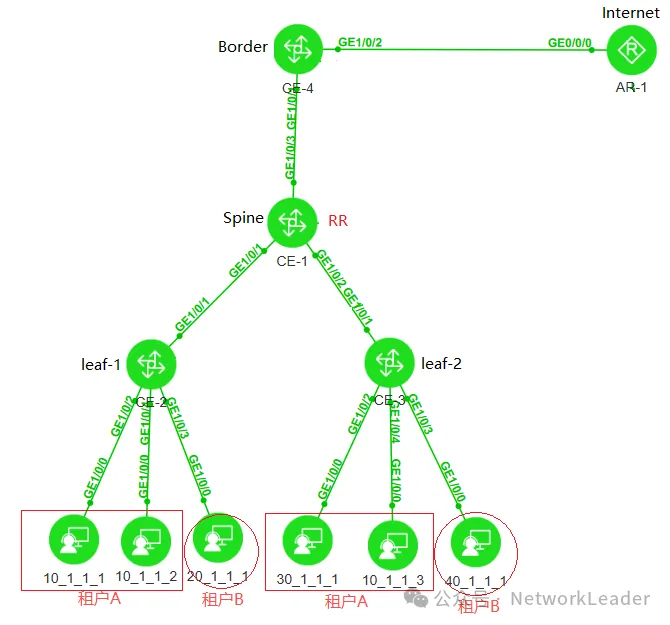
如图:10.0.0.0和30.0.0.0网段属于A公司,20.0.0.0和40.0.0.0属于B公司。
(1)CE2、CE3为leaf交换机,分布式vxlan实现A公司内部网段互通、B公司内部网段互通。
(2)CE4为border-leaf交换机,要求AB两公司都能访问互联网AR-1(8.8.8.8)。
(3)要求AB两公司,通过三层网关互通。(网关后期可以通过墙互通)
(4)要求使用evpn最少配置命令,分步骤解释每条命令的含义。
二、基础配置
本章节主要讲述underlay网络的配置,包含接口IP、ospf,loopback接口等,详细配置如下:
1. CE1基础配置
interface MEth0/0/0
 ip binding vpn-instance _management_vpn_
 ip address 192.168.69.11 255.255.255.0
#
interface GE1/0/1
 undo portswitch
 ip address 10.1.12.1 255.255.255.0
 ospf network-type p2p
#
interface GE1/0/2
 undo portswitch
 ip address 10.1.13.1 255.255.255.0
 ospf network-type p2p
#
interface GE1/0/3
 undo portswitch
 ip address 10.1.14.1 255.255.255.0
 ospf network-type p2p
#
interface LoopBack0
 ip address 1.1.1.1 255.255.255.255
#
ospf 1 router-id 1.1.1.1
 area 0.0.0.0
  network 1.1.1.1 0.0.0.0
  network 10.1.12.1 0.0.0.0
  network 10.1.13.1 0.0.0.0
  network 10.1.14.1 0.0.0.0
2. CE2基础配置
interface GE1/0/1
 undo portswitch
 ip address 10.1.12.2 255.255.255.0
 ospf network-type p2p
#
interface GE1/0/2
#
interface GE1/0/2.10 mode l2
 encapsulation untag
 bridge-domain 10
#
interface GE1/0/3
#
interface GE1/0/3.10 mode l2
 encapsulation untag
 bridge-domain 20
#
interface GE1/0/4
#
interface GE1/0/4.10 mode l2
 encapsulation untag
 bridge-domain 10
#
interface LoopBack0
 ip address 2.2.2.2 255.255.255.255
#
ospf 1 router-id 2.2.2.2
 area 0.0.0.0
  network 2.2.2.2 0.0.0.0
  network 10.1.12.2 0.0.0.0
3. CE3基础配置
interface MEth0/0/0
 ip binding vpn-instance _management_vpn_
 ip address 192.168.69.13 255.255.255.0
#
interface GE1/0/1
 undo portswitch
 ip address 10.1.13.3 255.255.255.0
 ospf network-type p2p
#
interface GE1/0/2
#
interface GE1/0/2.30 mode l2
 encapsulation untag
 bridge-domain 30
#
interface GE1/0/3
#
interface GE1/0/3.40 mode l2
 encapsulation untag
 bridge-domain 40
#
interface GE1/0/4
#
interface GE1/0/4.10 mode l2
 encapsulation untag
 bridge-domain 10
#
interface LoopBack0
 ip address 3.3.3.3 255.255.255.255
#
4. CE4基础配置
interface MEth0/0/0
 ip binding vpn-instance _management_vpn_
 ip address 192.168.69.14 255.255.255.0
#
interface GE1/0/1
 undo portswitch
 ip address 10.1.14.4 255.255.255.0
 ospf network-type p2p
#
interface GE1/0/2
 undo portswitch
 ip address 202.1.1.254 255.255.255.0
#
interface LoopBack0
 ip address 4.4.4.4 255.255.255.255
#
ospf 1 router-id 4.4.4.4
 area 0.0.0.0
  network 4.4.4.4 0.0.0.0
  network 10.1.14.4 0.0.0.0
5. AR基础配置(模拟互联网)
interface MEth0/0/0
 ip binding vpn-instance _management_vpn_
 ip address 192.168.69.15 255.255.255.0
#
interface GE0/0/0
 ip address 202.1.1.1 255.255.255.0
#
interface LoopBack0
 ip address 8.8.8.8 255.255.255.255
#
ip route-static 10.1.1.0 255.255.255.0 202.1.1.254
ip route-static 20.1.1.0 255.255.255.0 202.1.1.254
ip route-static 30.1.1.0 255.255.255.0 202.1.1.254
ip route-static 40.1.1.0 255.255.255.0 202.1.1.254
6. 基础配置完毕后效果
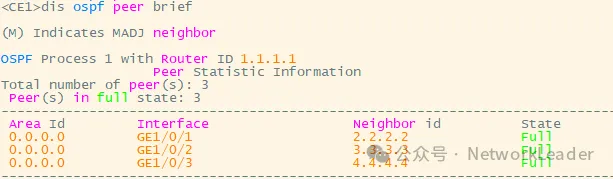
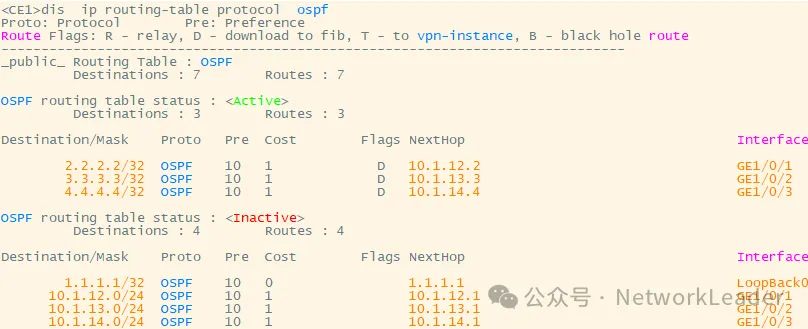
CE1-CE4全网ospf互通。
三、配置BGP建立evpn邻居
CE1作为BGP反射器RR,CE2-4作为leaf与RR建立邻居,并互相通告IRB类型的路由。
1. CE1交换机BGP配置
bgp 100
 router-id 1.1.1.1
 peer 2.2.2.2 as-number 100
 peer 2.2.2.2 connect-interface LoopBack0
 peer 3.3.3.3 as-number 100
 peer 3.3.3.3 connect-interface LoopBack0
 peer 4.4.4.4 as-number 100
 peer 4.4.4.4 connect-interface LoopBack0
 #underlay网络路由传递使用的ospf,因此可以将单播的bgp路由关闭。
 ipv4-family unicast
  peer 2.2.2.2 enable
  peer 3.3.3.3 enable
  peer 4.4.4.4 enable
 #
 l2vpn-family evpn
  undo policy vpn-target
  peer 2.2.2.2 enable
  peer 2.2.2.2 advertise irb
  peer 2.2.2.2 reflect-client
  peer 3.3.3.3 enable
  peer 3.3.3.3 advertise irb
  peer 3.3.3.3 reflect-client
  peer 4.4.4.4 enable
  peer 4.4.4.4 advertise irb
  peer 4.4.4.4 reflect-client
#
2. CE2交换机BGP配置
bgp 100
 router-id 2.2.2.2
 private-4-byte-as enable
 peer 1.1.1.1 as-number 100
 peer 1.1.1.1 connect-interface LoopBack0
 #
 ipv4-family unicast
  peer 1.1.1.1 enable
 #
 l2vpn-family evpn
  policy vpn-target
  peer 1.1.1.1 enable
  peer 1.1.1.1 advertise irb
3. CE3交换机BGP配置
bgp 100
 router-id 3.3.3.3
 private-4-byte-as enable
 peer 1.1.1.1 as-number 100
 peer 1.1.1.1 connect-interface LoopBack0
 #
 ipv4-family unicast
  undo peer 1.1.1.1 enable
 #
 l2vpn-family evpn
  policy vpn-target
  peer 1.1.1.1 enable
  peer 1.1.1.1 advertise irb
4. CE4交换机BGP配置
bgp 100
 router-id 4.4.4.4
 private-4-byte-as enable
 peer 1.1.1.1 as-number 100
 peer 1.1.1.1 connect-interface LoopBack0
 #
 ipv4-family unicast
  undo peer 1.1.1.1 enable
 #
 l2vpn-family evpn
  policy vpn-target
  peer 1.1.1.1 enable
  peer 1.1.1.1 advertise irb
#
5. BGP 配置结果

此时的BGP EVPN路由表是空的:

四、配置BD接入
1. CE2交换机BD接入配置
#
bridge-domain 10
#
bridge-domain 20
#
bridge-domain 30
#
bridge-domain 40
#
interface GE1/0/2
#
interface GE1/0/2.10 mode l2
 encapsulation untag
 bridge-domain 10
#
interface GE1/0/3
#
interface GE1/0/3.20 mode l2
 encapsulation untag
 bridge-domain 20
#
interface GE1/0/4
#
interface GE1/0/4.10 mode l2
 encapsulation untag
 bridge-domain 10
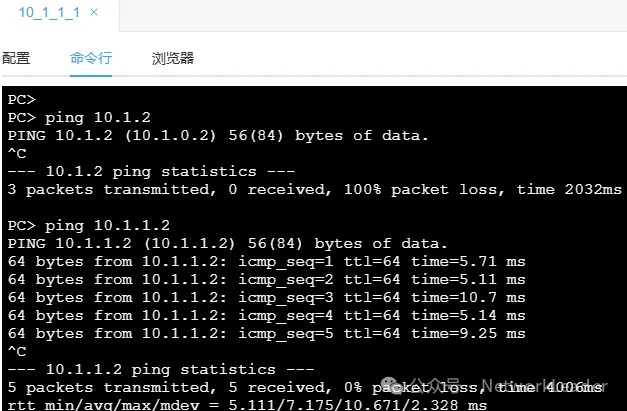
配置完毕后,10.1.1.1能ping通10.1.1.2(两台服务器均在同一台设备的同一个bd下接入)
2. CE3交换机BD接入配置
#
bridge-domain 10
#
bridge-domain 20
#
bridge-domain 30
#
bridge-domain 40
#
interface GE1/0/2
#
interface GE1/0/2.30 mode l2
 encapsulation untag
 bridge-domain 30
#
interface GE1/0/3
#
interface GE1/0/3.40 mode l2
 encapsulation untag
 bridge-domain 40
#
interface GE1/0/4
#
interface GE1/0/4.10 mode l2
 encapsulation untag
 bridge-domain 10
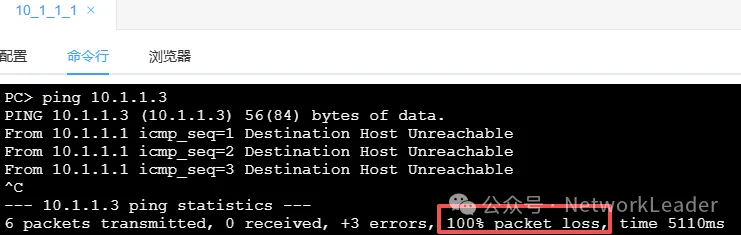
问题1:都属于bd10 跨交换机能不能通呢?使用10.1.1.1 ping 10.1.1.3。
答案:不能,因为目前的配置,vxlan隧道还没建立起来,跨交换机二层不能通信。
3. vbdif和vxlan的关系详解(配置脚本忽略)
-
注意:本小节只是为了讲解vxlan与vlan的关系,使用的脚本只是为了验证vbdif和vlanif的关系,不涉及本实验的实际配置。
#CE2和CE3均配置,分布式网关的vbdif的ip地址和mac地址在不同的设备上需要保持相同。
#在实际场景中A公司和B公司分别归属于不同的ip vpn-instance ,当不同网段关联到不同的vpn实例中时,仅仅靠下面的配置,不同网段之间是无法互通的。
#本配置只是为了展示,bd、vbdif的功能分别对应vlan、vlanif的功能,临时配置都在public的vpn实例中。
#
interface Vbdif10
 ip address 10.1.1.254 255.255.255.0
 mac-address 0000-5e00-0001
#
interface Vbdif20
 ip address 20.1.1.254 255.255.255.0
 mac-address 0000-5e00-0002
#
interface Vbdif30
 ip address 30.1.1.254 255.255.255.0
 mac-address 0000-5e00-0003
#
interface Vbdif40
 ip address 40.1.1.254 255.255.255.0
 mac-address 0000-5e00-0004
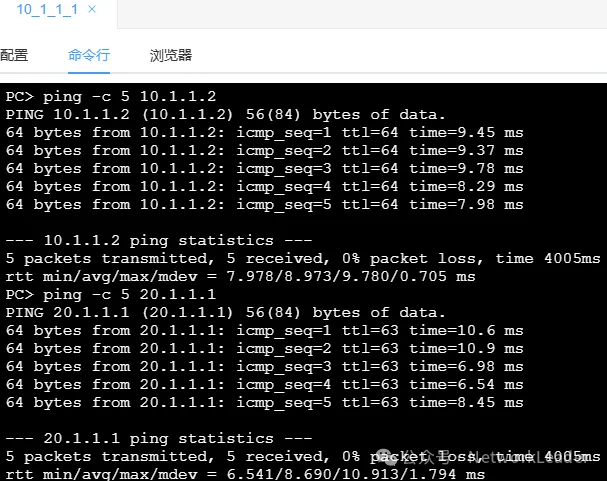
配置完后,CE2交换机下面的10.1.1.1可以正常访问CE2交换机下面的20.1.1.1。(和vlanif的效果相同)
五、EVPN相关配置
问题2:只配置ip vpn-instance a,这条命令可以吗?答案:不可以。需要配置RD激活ipv4地址族,否则在vbdif下面配置IP地址时会报错![CE2]interface Vbdif10[CE2-Vbdif10]ip binding vpn-instance a[CE2-Vbdif10]mac-address 0000-5e00-0001[CE2-Vbdif10]ip add 10.1.1.254 24Error: The IPv4 address cannot be configured because the IPv4 address family of the VPN instance is not enabled.
分布式vxlan如果每个leaf下都可能部署不同网段的虚拟机,建议所有的ip vpn-instance和所有的vbdif都配置。
1. CE2交换机上VPN实例配置
ip vpn-instance a
 ipv4-family
  route-distinguisher 100:1
#
ip vpn-instance b
 ipv4-family
  route-distinguisher 100:2

# 然后配置vbdif绑定对应的vpn实例,并配置网关地址。开启分布式vxlan和收集主机arp信息

interface Vbdif10
 ip binding vpn-instance a
 ip address 10.1.1.254 255.255.255.0
 mac-address 0000-5e00-0001
 vxlan anycast-gateway enable
 arp collect host enable
#
interface Vbdif20
 ip binding vpn-instance b
 ip address 20.1.1.254 255.255.255.0
 mac-address 0000-5e00-0002
 vxlan anycast-gateway enable
 arp collect host enable
#
interface Vbdif30
 ip binding vpn-instance a
 ip address 30.1.1.254 255.255.255.0
 mac-address 0000-5e00-0003
 vxlan anycast-gateway enable
 arp collect host enable
#
interface Vbdif40
 ip binding vpn-instance b
 ip address 40.1.1.254 255.255.255.0
 mac-address 0000-5e00-0004
 vxlan anycast-gateway enable
 arp collect host enable
2. CE3交换机VPN实例配置
ip vpn-instance a
 ipv4-family
  route-distinguisher 200:1
#
ip vpn-instance b
 ipv4-family
  route-distinguisher 200:2
# 然后配置vbdif绑定对应的vpn实例,并配置网关地址。
interface Vbdif10
 ip binding vpn-instance a
 ip address 10.1.1.254 255.255.255.0
 mac-address 0000-5e00-0001
 vxlan anycast-gateway enable
 arp collect host enable
#
interface Vbdif20
 ip binding vpn-instance b
 ip address 20.1.1.254 255.255.255.0
 mac-address 0000-5e00-0002
 vxlan anycast-gateway enable
 arp collect host enable
#
interface Vbdif30
 ip binding vpn-instance a
 ip address 30.1.1.254 255.255.255.0
 mac-address 0000-5e00-0003
 vxlan anycast-gateway enable
 arp collect host enable
#
interface Vbdif40
 ip binding vpn-instance b
 ip address 40.1.1.254 255.255.255.0
 mac-address 0000-5e00-0004
 vxlan anycast-gateway enable
 arp collect host enable
3. 配置VPN实例后效果
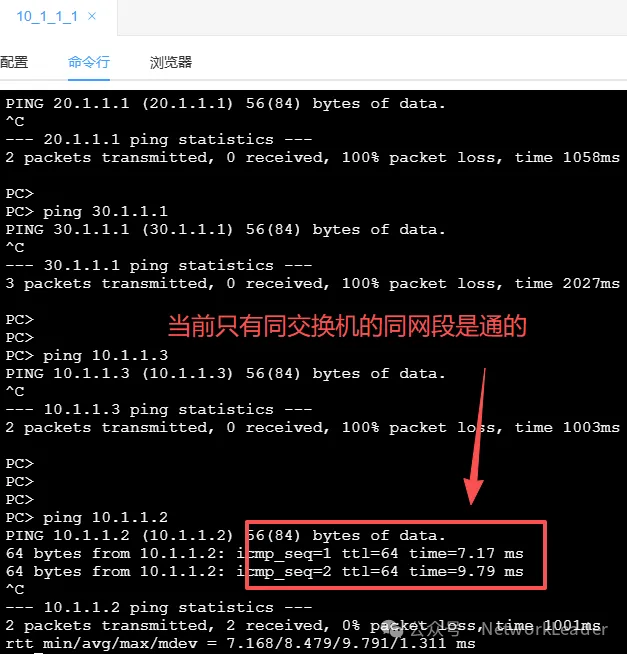
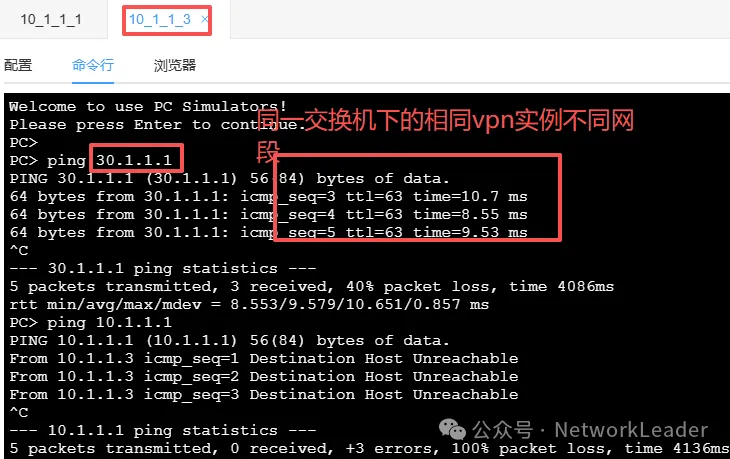
配置完vpn实例后,发现只有同交换机的相同vpn实例是能通信的,不同vpn实例不能通信。
六、配置EVPN
1. CE2交换机NVE及EVPN配置
# vpn实例a的三层vni。
ip vpn-instance a
 ipv4-family
  route-distinguisher 100:1
   vpn-target 100:1 import-extcommunity evpn
  vxlan vni 10

# vpn实例b的三层vni。
ip vpn-instance b
 ipv4-family
  route-distinguisher 100:2
   vpn-target 100:2 import-extcommunity evpn
  vxlan vni 20
===================
# bd下面配置的是二层vni。
bridge-domain 10
 vxlan vni 1
 #
 evpn
  route-distinguisher 1000:1
   vpn-target 1:1 both   #用于同一个vni下的不同leaf下的终端的互通。
   vpn-target 100:1 export-extcommunity  #用于同一个租户的跨网段的互访,等于对端网段的vpn实例下的eirt。
#
bridge-domain 20
 vxlan vni 2
 #
 evpn
  route-distinguisher 1000:2
   vpn-target 1:2 both
   vpn-target 100:2 export-extcommunity
#
bridge-domain 30
 vxlan vni 3
 #
 evpn
  route-distinguisher 1000:3
   vpn-target 1:3 both
   vpn-target 100:1 export-extcommunity
#
bridge-domain 40
 vxlan vni 4
 #
 evpn
  route-distinguisher 1000:4
   vpn-target 1:4 both
   vpn-target 100:2 export-extcommunity

interface Nve1
 source 2.2.2.2
 vni 1 head-end peer-list protocol bgp
 vni 2 head-end peer-list protocol bgp
 vni 3 head-end peer-list protocol bgp
 vni 4 head-end peer-list protocol bgp
2. CE3交换机NVE及EVPN配置
# vpn 实例a的三层vni。

ip vpn-instance a
 ipv4-family
  route-distinguisher 200:1
  vpn-target 100:1 import-extcommunity evpn
#
  vxlan vni 10

# vpn 实例b的三层vni。
ip vpn-instance b
 ipv4-family
  route-distinguisher 200:2
  vpn-target 100:2 import-extcommunity evpn
#
  vxlan vni 20
=========================
bridge-domain 10
 vxlan vni 1
 #
 evpn
  route-distinguisher 2000:1
   vpn-target 1:1 both
   vpn-target 100:1 export-extcommunity
#
bridge-domain 20
 vxlan vni 2
 #
 evpn
  route-distinguisher 2000:2
   vpn-target 1:2 both
   vpn-target 100:2 export-extcommunity
#
bridge-domain 30
 vxlan vni 3
 #
 evpn
  route-distinguisher 2000:3
   vpn-target 1:3 both
   vpn-target 100:1 export-extcommunity
#
bridge-domain 40
 vxlan vni 4
 #
 evpn
  route-distinguisher 2000:4
   vpn-target 1:4 both
   vpn-target 100:2 export-extcommunity

interface Nve1
 source 3.3.3.3
 vni 1 head-end peer-list protocol bgp
 vni 2 head-end peer-list protocol bgp
 vni 3 head-end peer-list protocol bgp
 vni 4 head-end peer-list protocol bgp
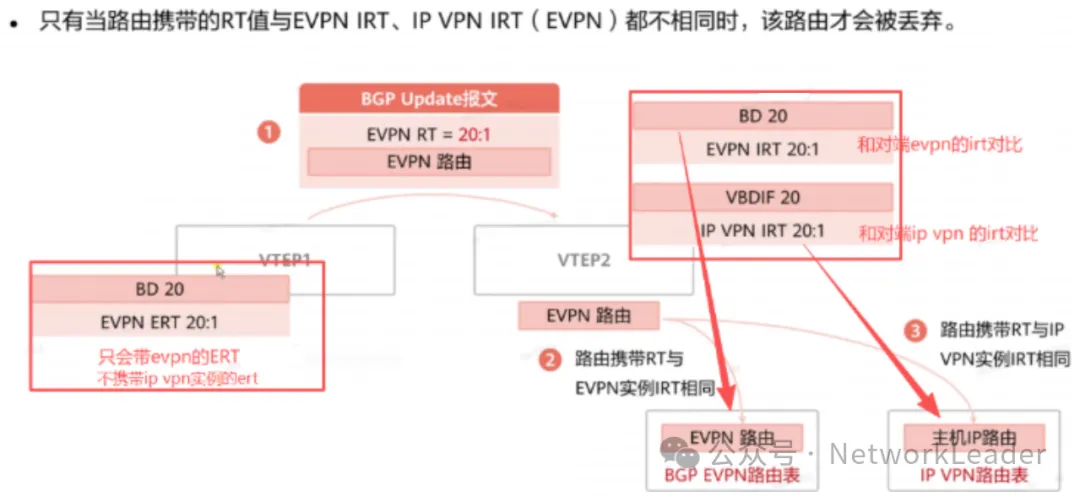
问题3:10.1.1.1访问10.1.1.3都需要哪些vpn实例匹配? 答案:10.1.1.1和10.1.1.3互访只需要保证本端BD下的evpn的eert等于 对端的BD下的evpn的eirt。 即:CE2的BD10的evpn下的Eert等于CE3的BD10的evpn下的Eirt, 同时CE3的BD10的evpn下的Eert等于CE2的BD10的evpn下的Eirt。---------------------------------------------------------------------问题4:10.1.1.1访问30.1.1.1都需要哪些vpn实例匹配? 答案:10.1.1.1和30.1.1.1互访需要保证本端BD下的evpn的eert等于 对端ip vpn实例下的Eirt。 即:CE2的BD10的evpn下的Eert等于CE3的ip vpn-instance a下的Eirt, 同时CE3的BD30的evpn下的Eirt等于CE2的ip vpn-instance a下的Eirt。==========================================================================规律:都是携带的本端的bd下的eert,二层互访比较对端BD下的eirt, 三层互访比较对端vpn实例下的eirt。(双向对比)在没有BD接入的三层vpn实例互通的场景下: 携带的是本端的vpn实例下的eert。如本例中的CE4携带vpn实例a下的100:1eert。
3. EVPN配置效果

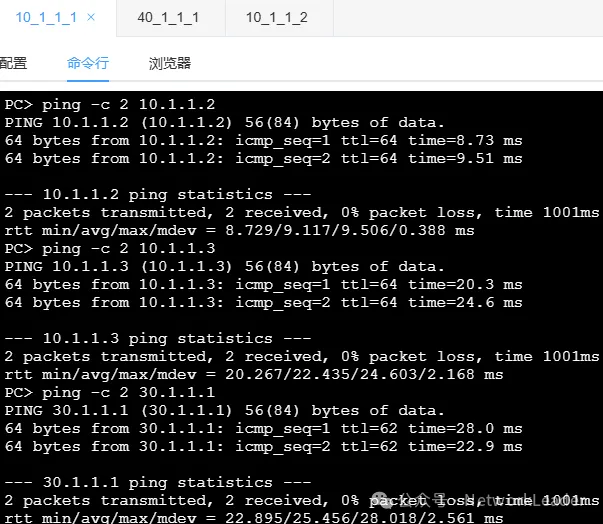
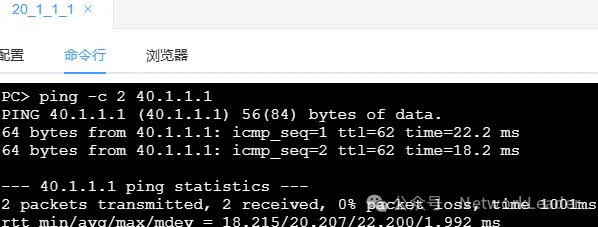
至此,SDN内部的网络已经可以正常通信了,但是不同租户之间的网络是不能通信的,两个租户访问外网的流量是不能通信的。
[CE2]dis bgp evpn all  routing-table
 Local AS number : 100

 BGP Local router ID is 2.2.2.2
 Status codes: * - valid, > - best, d - damped, x - best external, a - add path,
               h - history,  i - internal, s - suppressed, S - Stale
               Origin : i - IGP, e - EGP, ? - incomplete


 EVPN address family:
 Number of Mac Routes: 19      ###MAC-Router一共19条,详细信息如下:
 Route Distinguisher: 1000:1   #BD10的RD下的路由条目
       Network(EthTagId/MacAddrLen/MacAddr/IpAddrLen/IpAddr)  NextHop
 *>    0:48:0000-5e00-0001:0:0.0.0.0                          0.0.0.0   #vbdif10的MAC地址--直连
 *>    0:48:c8d5-1529-80a9:0:0.0.0.0                          0.0.0.0   #10.1.1.2的MAC地址---直连
 *>    0:48:ca07-9654-ad14:0:0.0.0.0                          0.0.0.0   #10.1.1.1的MAC地址---直连
 *>    0:48:ca07-9654-ad14:32:10.1.1.1                        0.0.0.0   #
 Route Distinguisher: 1000:2
       Network(EthTagId/MacAddrLen/MacAddr/IpAddrLen/IpAddr)  NextHop
 *>    0:48:0000-5e00-0002:0:0.0.0.0                          0.0.0.0
 *>    0:48:f29c-e517-d601:0:0.0.0.0                          0.0.0.0
 *>    0:48:f29c-e517-d601:32:20.1.1.1                        0.0.0.0
 Route Distinguisher: 1000:3
       Network(EthTagId/MacAddrLen/MacAddr/IpAddrLen/IpAddr)  NextHop
 *>    0:48:0000-5e00-0003:0:0.0.0.0                          0.0.0.0
 Route Distinguisher: 1000:4
       Network(EthTagId/MacAddrLen/MacAddr/IpAddrLen/IpAddr)  NextHop
 *>    0:48:0000-5e00-0004:0:0.0.0.0                          0.0.0.0
 Route Distinguisher: 2000:1
       Network(EthTagId/MacAddrLen/MacAddr/IpAddrLen/IpAddr)  NextHop
 *>i   0:48:0000-5e00-0001:0:0.0.0.0                          3.3.3.3
 *>i   0:48:389f-3575-0612:0:0.0.0.0                          3.3.3.3
 *>i   0:48:389f-3575-0612:32:10.1.1.3                        3.3.3.3
 Route Distinguisher: 2000:2
       Network(EthTagId/MacAddrLen/MacAddr/IpAddrLen/IpAddr)  NextHop
 *>i   0:48:0000-5e00-0002:0:0.0.0.0                          3.3.3.3
 Route Distinguisher: 2000:3
       Network(EthTagId/MacAddrLen/MacAddr/IpAddrLen/IpAddr)  NextHop
 *>i   0:48:0000-5e00-0003:0:0.0.0.0                          3.3.3.3
 *>i   0:48:3c8a-f406-5238:0:0.0.0.0                          3.3.3.3
 *>i   0:48:3c8a-f406-5238:32:30.1.1.1                        3.3.3.3
 Route Distinguisher: 2000:4
       Network(EthTagId/MacAddrLen/MacAddr/IpAddrLen/IpAddr)  NextHop
 *>i   0:48:0000-5e00-0004:0:0.0.0.0                          3.3.3.3
 *>i   0:48:8e9b-4635-72a7:0:0.0.0.0                          3.3.3.3
 *>i   0:48:8e9b-4635-72a7:32:40.1.1.1                        3.3.3.3


 EVPN-Instance 10:
 Number of Mac Routes: 7
       Network(EthTagId/MacAddrLen/MacAddr/IpAddrLen/IpAddr)  NextHop
 *>    0:48:0000-5e00-0001:0:0.0.0.0                          0.0.0.0
 * i                                                          3.3.3.3
 *>i   0:48:389f-3575-0612:0:0.0.0.0                          3.3.3.3
 *>i   0:48:389f-3575-0612:32:10.1.1.3                        3.3.3.3
 *>    0:48:c8d5-1529-80a9:0:0.0.0.0                          0.0.0.0
 *>    0:48:ca07-9654-ad14:0:0.0.0.0                          0.0.0.0
 *>    0:48:ca07-9654-ad14:32:10.1.1.1                        0.0.0.0


 EVPN-Instance 20:
 Number of Mac Routes: 4
       Network(EthTagId/MacAddrLen/MacAddr/IpAddrLen/IpAddr)  NextHop
 *>    0:48:0000-5e00-0002:0:0.0.0.0                          0.0.0.0
 * i                                                          3.3.3.3
 *>    0:48:f29c-e517-d601:0:0.0.0.0                          0.0.0.0
 *>    0:48:f29c-e517-d601:32:20.1.1.1                        0.0.0.0


 EVPN-Instance 30:
 Number of Mac Routes: 4
       Network(EthTagId/MacAddrLen/MacAddr/IpAddrLen/IpAddr)  NextHop
 *>    0:48:0000-5e00-0003:0:0.0.0.0                          0.0.0.0
 * i                                                          3.3.3.3
 *>i   0:48:3c8a-f406-5238:0:0.0.0.0                          3.3.3.3
 *>i   0:48:3c8a-f406-5238:32:30.1.1.1                        3.3.3.3


 EVPN-Instance 40:
 Number of Mac Routes: 4
       Network(EthTagId/MacAddrLen/MacAddr/IpAddrLen/IpAddr)  NextHop
 *>    0:48:0000-5e00-0004:0:0.0.0.0                          0.0.0.0
 * i                                                          3.3.3.3
 *>i   0:48:8e9b-4635-72a7:0:0.0.0.0                          3.3.3.3
 *>i   0:48:8e9b-4635-72a7:32:40.1.1.1                        3.3.3.3

 EVPN address family:
 Number of Inclusive Multicast Routes: 8
 Route Distinguisher: 1000:1
       Network(EthTagId/IpAddrLen/OriginalIp)                 NextHop
 *>    0:32:2.2.2.2                                           0.0.0.0
 Route Distinguisher: 1000:2
       Network(EthTagId/IpAddrLen/OriginalIp)                 NextHop
 *>    0:32:2.2.2.2                                           0.0.0.0
 Route Distinguisher: 1000:3
       Network(EthTagId/IpAddrLen/OriginalIp)                 NextHop
 *>    0:32:2.2.2.2                                           0.0.0.0
 Route Distinguisher: 1000:4
       Network(EthTagId/IpAddrLen/OriginalIp)                 NextHop
 *>    0:32:2.2.2.2                                           0.0.0.0
 Route Distinguisher: 2000:1
       Network(EthTagId/IpAddrLen/OriginalIp)                 NextHop
 *>i   0:32:3.3.3.3                                           3.3.3.3
 Route Distinguisher: 2000:2
       Network(EthTagId/IpAddrLen/OriginalIp)                 NextHop
 *>i   0:32:3.3.3.3                                           3.3.3.3
 Route Distinguisher: 2000:3
       Network(EthTagId/IpAddrLen/OriginalIp)                 NextHop
 *>i   0:32:3.3.3.3                                           3.3.3.3
 Route Distinguisher: 2000:4
       Network(EthTagId/IpAddrLen/OriginalIp)                 NextHop
 *>i   0:32:3.3.3.3                                           3.3.3.3


 EVPN-Instance 10:
 Number of Inclusive Multicast Routes: 2
       Network(EthTagId/IpAddrLen/OriginalIp)                 NextHop
 *>    0:32:2.2.2.2                                           0.0.0.0
 *>i   0:32:3.3.3.3                                           3.3.3.3


 EVPN-Instance 20:
 Number of Inclusive Multicast Routes: 2
       Network(EthTagId/IpAddrLen/OriginalIp)                 NextHop
 *>    0:32:2.2.2.2                                           0.0.0.0
 *>i   0:32:3.3.3.3                                           3.3.3.3


 EVPN-Instance 30:
 Number of Inclusive Multicast Routes: 2
       Network(EthTagId/IpAddrLen/OriginalIp)                 NextHop
 *>    0:32:2.2.2.2                                           0.0.0.0
 *>i   0:32:3.3.3.3                                           3.3.3.3


 EVPN-Instance 40:
 Number of Inclusive Multicast Routes: 2
       Network(EthTagId/IpAddrLen/OriginalIp)                 NextHop
 *>    0:32:2.2.2.2                                           0.0.0.0
 *>i   0:32:3.3.3.3                                           3.3.3.3
[CE2]
七、租户访问互联网及租户之间互通配置
1. CE4上配置VPN实例及NVE并创建VXLAN隧道
ip vpn-instance a
 ipv4-family
  route-distinguisher 300:1
  vpn-target 100:1 import-extcommunity evpn
 vxlan vni 10
#
ip vpn-instance b
 ipv4-family
  route-distinguisher 300:2
  vpn-target 100:2 import-extcommunity evpn
 vxlan vni 20

#
interface Nve1
 source 4.4.4.4
配置完毕后,CE4分别和CE2、CE3建立起vxlan隧道。

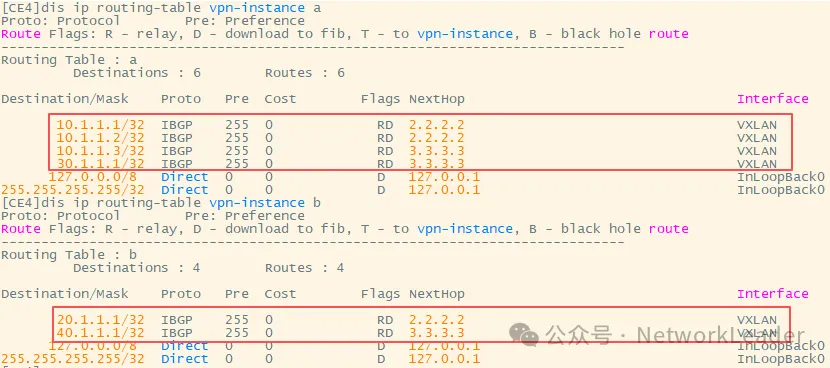
CE4的ip vpn实例下能学习到各个vpn实例的路由条目:
2. CE4上配置静态路由并发布给内部
问题5:CE4是border-leaf实去外网的出口,有去外网的路由条目,但是如何将去外网的路由通过evpn发布给内部的CE2和CE3呢?
答案:通过在bgp下面创建基于vpn实例的地址族,将静态路由引入到bgp中,显示向evpn邻居通告。(不要忘记在CE4上的ip vpn-instance下面增加eert)-----------------------------------------
注意点:CE4通过BGP将静态路由通过evpn传递给内部的server-leaf时,他携带的EERT是什么?从哪里配置?
答案:CE4作为哦border-leaf上面没有bd接入,但是他需要将vpn实例学习到的路由,根据vpn实例的名称传递到内网vpn实例。首先CE4需要在vpn实例下
常见export的eert,然后携带该eert属性将路由传递给server-leaf交换机。
ip vpn-instance a中需要添加100:1的eert。ip vpn-instance b中需要添加100:2的eert。
<CE4>dis cu
evpn-overlay enable
#
ip vpn-instance a
 ipv4-family
  route-distinguisher 100:1
  vpn-target 100:1 export-extcommunity evpn  ###增加EERT属性将路由发布给内部邻居
  vpn-target 100:1 import-extcommunity evpn
 vxlan vni 10
#
ip vpn-instance b
 ipv4-family
  route-distinguisher 100:2
  vpn-target 100:2 export-extcommunity evpn ###增加EERT属性将路由发布给内部邻居
  vpn-target 100:2 import-extcommunity evpn
 vxlan vni 20
#
interface Nve1
 source 4.4.4.4     #需要和leaf交换机建立vxlan隧道,将外部路由信心传递到leaf内部。
#
bgp 100
 router-id 4.4.4.4
 peer 1.1.1.1 as-number 100
 peer 1.1.1.1 connect-interface LoopBack0
 #
 ipv4-family unicast
  peer 1.1.1.1 enable
 #
 ipv4-family vpn-instance a    ###通过bgp将静态路由引入通过evpn进行发布
  import-route static
  default-route imported
  advertise l2vpn evpn
 #
 ipv4-family vpn-instance b   ###通过bgp将静态路由引入通过evpn进行发布
  import-route static
  default-route imported
  advertise l2vpn evpn
 #
 l2vpn-family evpn
  policy vpn-target
  peer 1.1.1.1 enable
  peer 1.1.1.1 advertise irb
#
配置静态路由条目:
ip route-static 10.1.1.1 255.255.255.255 vpn-instance a 10.1.1.1
ip route-static 10.1.1.2 255.255.255.255 vpn-instance a 10.1.1.2
ip route-static 10.1.1.3 255.255.255.255 vpn-instance a 10.1.1.3
ip route-static 20.1.1.1 255.255.255.255 vpn-instance b 20.1.1.1
ip route-static 30.1.1.1 255.255.255.255 vpn-instance a 30.1.1.1
ip route-static 40.1.1.1 255.255.255.255 vpn-instance b 40.1.1.1
ip route-static vpn-instance a 0.0.0.0 0.0.0.0 202.1.1.1 public
ip route-static vpn-instance a 8.8.8.8 255.255.255.255 202.1.1.1 public
ip route-static vpn-instance b 0.0.0.0 0.0.0.0 202.1.1.1 public
ip route-static vpn-instance b 8.8.8.8 255.255.255.255 202.1.1.1 public
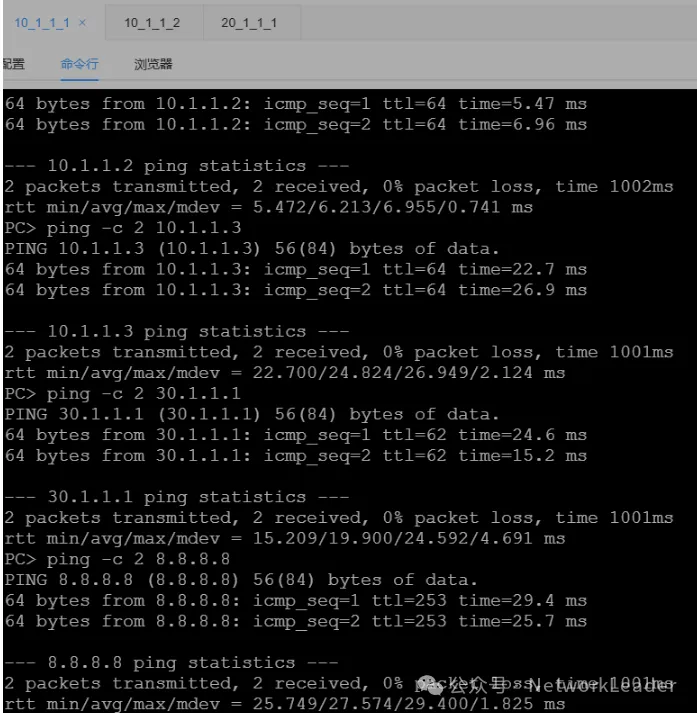
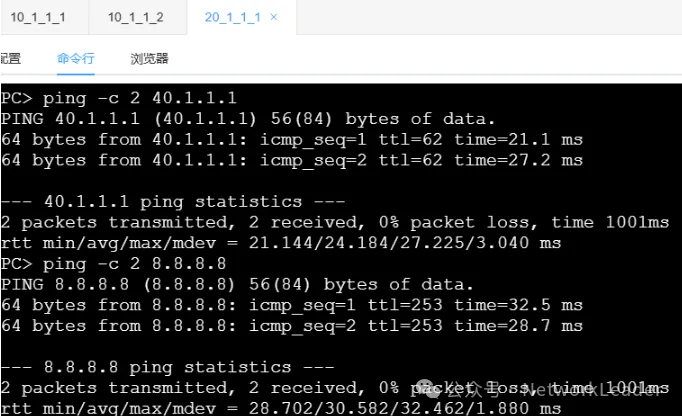
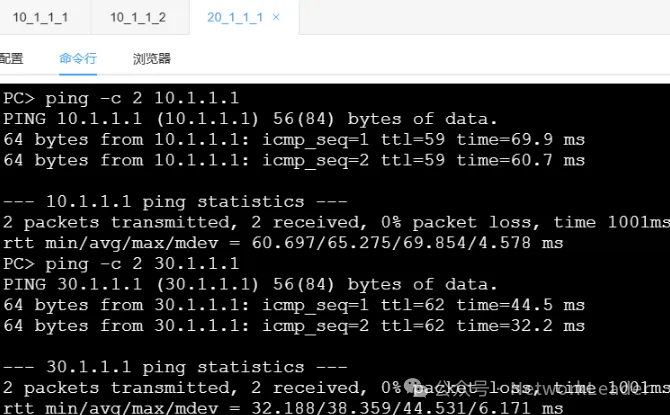
3.全网配置效果
A租户内部全通,A租户访问互联网全通。
B租户内部全通,B租户访问互联网全通。
A租户和B租户互通:
八、附件
添加微信好友start_starting(与CSDN同名)进行技术交流或获取lab附件。
更多推荐
 21
21 0
0- 0


 已为社区贡献1条内容

所有评论(0)