
第二章 Spring Cloud Eureka 上篇
CAP
明显的区别可能就是Zookeeper为CP设计,而Eureka为AP设计
CAP理论提出就是针对分布式数据库环境的,所以,P这个属性是必须具备的。
P就是在分布式环境中,由于网络的问题可能导致某个节点和其它节点失去联系,这时候就形成了P(partition),也就是由于网络问题,将系统的成员隔离成了2个区域,互相无法知道对方的状态,这在分布式环境下是非常常见的。
因为P是必须的,那么我们需要选择的就是A和C。
大家知道,在分布式环境下,为了保证系统可用性,通常都采取了复制的方式,避免一个节点损坏,导致系统不可用。那么就出现了每个节点上的数据出现了很多个副本的情况,而数据从一个节点复制到另外的节点时需要时间和要求网络畅通的,所以,当P发生时,也就是无法向某个节点复制数据时,这时候你有两个选择:
选择可用性 A(Availability),此时,那个失去联系的节点依然可以向系统提供服务,不过它的数据就不能保证是同步的了(失去了C属性)。
选择一致性C(Consistency),为了保证数据库的一致性,我们必须等待失去联系的节点恢复过来,在这个过程中,那个节点是不允许对外提供服务的,这时候系统处于不可用状态(失去了A属性)。
最常见的例子是读写分离,某个节点负责写入数据,然后将数据同步到其它节点,其它节点提供读取的服务,当两个节点出现通信问题时,你就面临着选择A(继续提供服务,但是数据不保证准确),C(用户处于等待状态,一直等到数据同步完成)。
入门案例
parent项目
    <parent>
        <groupId>org.springframework.boot</groupId>
        <artifactId>spring-boot-starter-parent</artifactId>
        <version>2.0.3.RELEASE</version>
        <relativePath/>
    </parent>
    <properties>
        <spring-cloud.version>Finchley.RELEASE</spring-cloud.version>
    </properties>

    <dependencyManagement>
        <dependencies>
            <dependency>
                <groupId>org.springframework.cloud</groupId>
                <artifactId>spring-cloud-dependencies</artifactId>
                <version>${spring-cloud.version}</version>
                <type>pom</type>
                <scope>import</scope>
            </dependency>
        </dependencies>
    </dependencyManagement>

    <dependencies>
        <dependency>
            <groupId>org.springframework.boot</groupId>
            <artifactId>spring-boot-starter-web</artifactId>
        </dependency>
        <dependency>
            <groupId>org.springframework.boot</groupId>
            <artifactId>spring-boot-starter-test</artifactId>
            <scope>test</scope>
        </dependency>
    </dependencies>
eureka server
	<dependencies>
		<dependency>
			<groupId>org.springframework.cloud</groupId>
			<artifactId>spring-cloud-starter-netflix-eureka-server</artifactId>
		</dependency>
	</dependencies>
@EnableEurekaServer

server:
  port: 8761

eureka:
  instance:
    hostname: localhost
  client:
    registerWithEureka: false ##注册到eureka关闭
    fetchRegistry: false ##抓取其他eureka的实例注册信息
    serviceUrl:    ## 访问eureka 界面的url
      defaultZone: http://${eureka.instance.hostname}:${server.port}/eureka/
  server:
      waitTimeInMsWhenSyncEmpty: 0  ##asyn是异步,sync是同步,等待时间秒数 当 同步 为空时 为0
      enableSelfPreservation: false  ## 打开自保留 为false

preservable
英 [prɪ'zɜːvəbl]  美 [prɪ'zɝvəbəl]
adj. 可保存的;可保管的;能储藏的

preservation
英 [prezə'veɪʃ(ə)n]  美 [,prɛzɚ'veʃən]
n. 保存,保留
eureka client
	<dependencies>
		<dependency>
			<groupId>org.springframework.cloud</groupId>
			<artifactId>spring-cloud-starter-netflix-eureka-client</artifactId>
		</dependency>
	</dependencies>
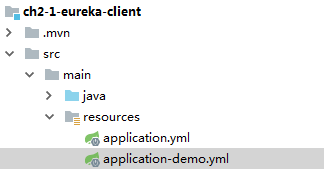
spring:
  profiles:
    active: demo

demo配置文件如下

server:
  port: 8081

spring:
  application:
    name: demo-client1

eureka:
  client:
    serviceUrl:
      defaultZone: http://localhost:8761/eureka/
Eureka Server的 Rest API
查询所有实例:
http://localhost:8761/eureka/apps
根据appId查询:
http://localhost:8761/eureka/apps/demo-client1
根据instanceId查询: instanceId在所有的实例里面可以看
curl -i http://localhost:8761/eureka/instances/zhangsan:demo-client1:8081
注销应用实例:后面跟的是 instanceId
curl -i -X DELETE http://localhost:8761/eureka/apps/demo-client1/zhangsan:demo-client1:8081
恢复应用实例:
curl -i -X DELETE http://localhost:8761/eureka/apps/demo-client1/zhangsan:demo-client1:8081/status
HTTP/1.1 200
测试心跳:
curl -i -X PUT http://localhost:8761/eureka/apps/demo-client1/zhangsan:demo-client1:8081
更多推荐
 0
0 0
0- 0


 已为社区贡献2条内容

所有评论(0)