
KMP鸿蒙客户满意度调查反馈
本文介绍了一个基于Kotlin Multiplatform和OpenHarmony平台的客户满意度调查系统。该系统通过实时监测产品、服务、价格、交付和整体满意度五个维度,采用智能算法评估客户体验并生成分级改进建议。核心功能包括多维度指标监测、满意度评估、改进建议生成和忠诚度预测。技术架构采用Kotlin后端实现核心算法,JavaScript中间层处理数据,ArkTS前端展示结果。系统适用于各类企业
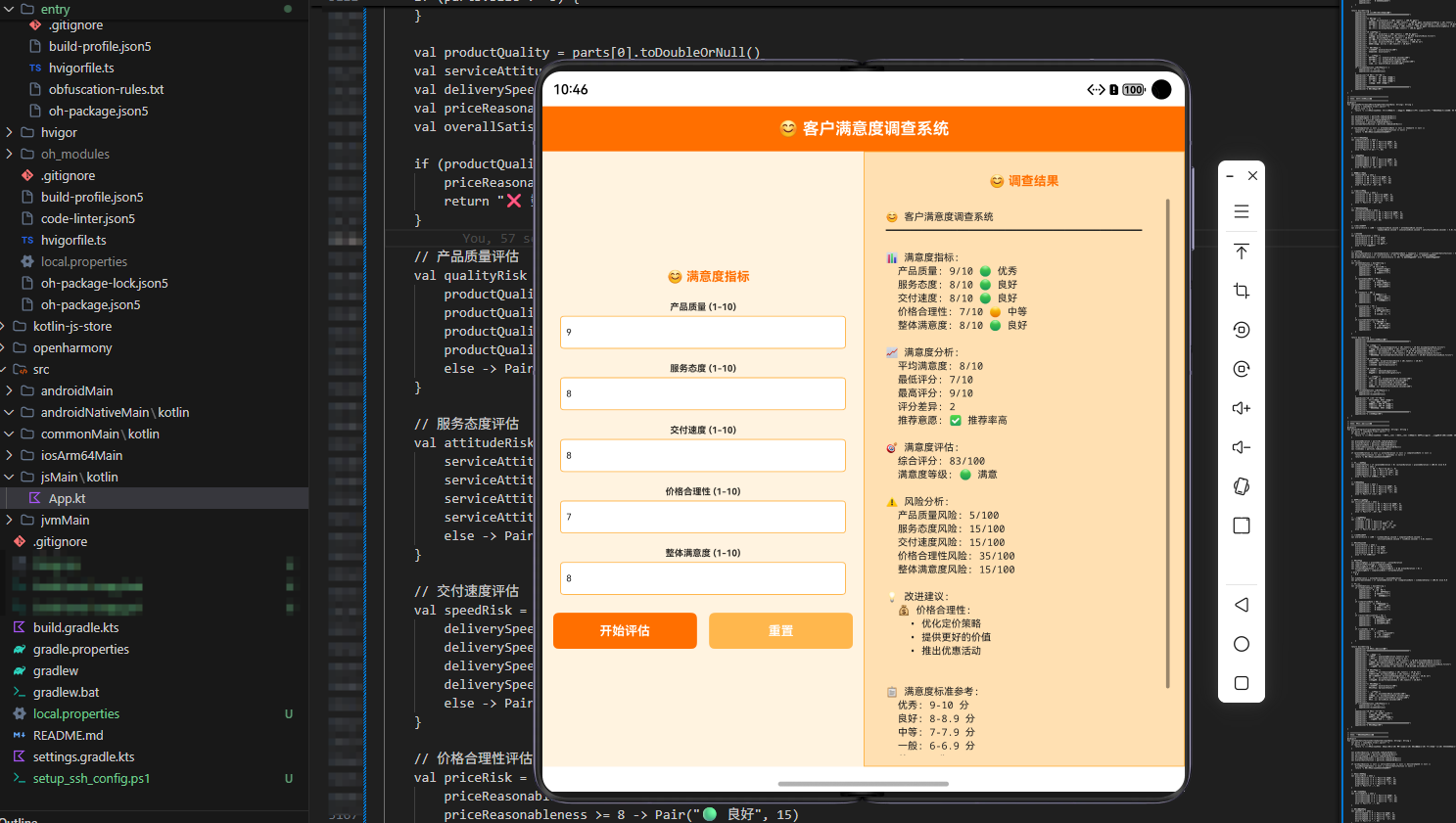
项目概述
客户满意度调查系统是一个基于Kotlin Multiplatform (KMP)和OpenHarmony平台开发的综合性客户体验管理解决方案。该系统通过实时收集和分析客户满意度的关键指标,包括产品满意度、服务满意度、价格满意度、交付满意度和整体满意度等,为企业客户管理部门提供科学的客户体验决策支持和改进建议。
客户满意度是企业竞争力的重要体现,直接影响到客户忠诚度和企业口碑。传统的满意度调查往往依赖定期问卷和人工统计,存在数据收集困难、分析不及时、改进建议不具体等问题。本系统通过引入先进的数据收集和分析技术,实现了对客户满意度的全面、实时、精准的监测和评估。该系统采用KMP技术栈,使得核心的满意度分析算法可以在Kotlin中编写,然后编译为JavaScript在Web端运行,同时通过ArkTS在OpenHarmony设备上调用,实现了跨平台的统一解决方案。
核心功能特性
1. 多维度满意度指标监测
系统能够同时监测产品满意度、服务满意度、价格满意度、交付满意度和整体满意度五个关键指标。这些指标的组合分析可以全面反映客户的体验状况。产品满意度衡量产品质量;服务满意度反映服务水平;价格满意度体现价格合理性;交付满意度关系到客户体验;整体满意度代表客户总体评价。
2. 智能满意度评估算法
系统采用多维度评估算法,综合考虑各个满意度指标的相对重要性,给出客观的满意度评分。通过建立满意度指标与客户忠诚度之间的映射关系,系统能够快速识别客户不满意的方面和改进空间。这种算法不仅考虑了单个指标的影响,还充分考虑了指标之间的相互关系和客户体验的整体性。
3. 分级改进建议生成
系统根据当前的满意度状况,生成分级的改进建议。对于满意度高的方面,系统建议保持现有水平;对于满意度低的方面,系统会提出具体的改进方案,包括改进的方向、预期效果等。这种分级方式确保了改进建议的针对性和实用性。
4. 客户忠诚度预测支持
系统能够计算客户的忠诚度指数,包括重复购买意愿、推荐意愿、流失风险等。通过这种量化的评估,企业可以清晰地了解客户的价值程度,为客户管理提供有力支撑。
技术架构
Kotlin后端实现
使用Kotlin语言编写核心的满意度分析算法和客户评估模型。Kotlin的简洁语法和强大的类型系统使得复杂的算法实现既易于维护又能保证运行时的安全性。通过@JsExport注解,将Kotlin函数导出为JavaScript,实现跨平台调用。
JavaScript中间层
Kotlin编译生成的JavaScript代码作为中间层,提供了Web端的数据处理能力。这一层负责接收来自各种数据源的输入,进行数据验证和转换,然后调用核心的分析算法。
ArkTS前端展示
在OpenHarmony设备上,使用ArkTS编写用户界面。通过调用JavaScript导出的函数,实现了与后端逻辑的无缝集成。用户可以通过直观的界面输入满意度数据,实时查看分析结果和改进建议。
应用场景
本系统适用于各类企业的客户管理部门,特别是:
- 零售企业的客户体验管理
- 服务企业的客户满意度管理
- 制造企业的客户反馈管理
- 企业的市场部门和客户服务部门
Kotlin实现代码
客户满意度调查系统核心算法
@JsExport
fun customerSatisfactionSurveySystem(inputData: String): String {
    val parts = inputData.trim().split(" ")
    if (parts.size != 5) {
        return "格式错误\n请输入: 产品满意度(%) 服务满意度(%) 价格满意度(%) 交付满意度(%) 整体满意度(%)\n例如: 85 88 80 90 87"
    }

    val productSatisfaction = parts[0].toDoubleOrNull()
    val serviceSatisfaction = parts[1].toDoubleOrNull()
    val priceSatisfaction = parts[2].toDoubleOrNull()
    val deliverySatisfaction = parts[3].toDoubleOrNull()
    val overallSatisfaction = parts[4].toDoubleOrNull()

    if (productSatisfaction == null || serviceSatisfaction == null || priceSatisfaction == null || deliverySatisfaction == null || overallSatisfaction == null) {
        return "数值错误\n请输入有效的数字"
    }

    // 参数范围验证
    if (productSatisfaction < 0 || productSatisfaction > 100) {
        return "产品满意度应在0-100%之间"
    }
    if (serviceSatisfaction < 0 || serviceSatisfaction > 100) {
        return "服务满意度应在0-100%之间"
    }
    if (priceSatisfaction < 0 || priceSatisfaction > 100) {
        return "价格满意度应在0-100%之间"
    }
    if (deliverySatisfaction < 0 || deliverySatisfaction > 100) {
        return "交付满意度应在0-100%之间"
    }
    if (overallSatisfaction < 0 || overallSatisfaction > 100) {
        return "整体满意度应在0-100%之间"
    }

    // 计算各指标的评分
    val productScore = productSatisfaction.toInt()
    val serviceScore = serviceSatisfaction.toInt()
    val priceScore = priceSatisfaction.toInt()
    val deliveryScore = deliverySatisfaction.toInt()
    val overallScore = overallSatisfaction.toInt()

    // 加权综合评分
    val compositeScore = (productScore * 0.25 + serviceScore * 0.25 + priceScore * 0.15 + deliveryScore * 0.20 + overallScore * 0.15).toInt()

    // 满意度等级判定
    val satisfactionLevel = when {
        compositeScore >= 90 -> "🟢 非常满意"
        compositeScore >= 75 -> "🟡 满意"
        compositeScore >= 60 -> "🟠 一般"
        else -> "🔴 不满意"
    }

    // 计算客户忠诚度指标
    val productGap = 100 - productSatisfaction
    val serviceGap = 100 - serviceSatisfaction
    val priceGap = 100 - priceSatisfaction
    val deliveryGap = 100 - deliverySatisfaction
    val overallGap = 100 - overallSatisfaction
    val totalGap = (productGap + serviceGap + priceGap + deliveryGap + overallGap) / 5

    // 计算流失风险
    val churnRisk = when {
        compositeScore < 60 -> 80
        compositeScore < 75 -> 50
        compositeScore < 90 -> 20
        else -> 5
    }

    // 生成详细报告
    return buildString {
        appendLine("╔════════════════════════════════════════╗")
        appendLine("║    😊 客户满意度调查系统分析报告      ║")
        appendLine("╚════════════════════════════════════════╝")
        appendLine()
        appendLine("📊 满意度指标监测")
        appendLine("━━━━━━━━━━━━━━━━━━━━━━━━━━━━━━━━━━━━━━━━━━━")
        appendLine("产品满意度: ${(productSatisfaction * 100).toInt() / 100.0}%")
        appendLine("服务满意度: ${(serviceSatisfaction * 100).toInt() / 100.0}%")
        appendLine("价格满意度: ${(priceSatisfaction * 100).toInt() / 100.0}%")
        appendLine("交付满意度: ${(deliverySatisfaction * 100).toInt() / 100.0}%")
        appendLine("整体满意度: ${(overallSatisfaction * 100).toInt() / 100.0}%")
        appendLine()
        appendLine("⭐ 指标评分")
        appendLine("━━━━━━━━━━━━━━━━━━━━━━━━━━━━━━━━━━━━━━━━━━━")
        appendLine("产品评分: $productScore/100")
        appendLine("服务评分: $serviceScore/100")
        appendLine("价格评分: $priceScore/100")
        appendLine("交付评分: $deliveryScore/100")
        appendLine("整体评分: $overallScore/100")
        appendLine()
        appendLine("🎯 综合评估")
        appendLine("━━━━━━━━━━━━━━━━━━━━━━━━━━━━━━━━━━━━━━━━━━━")
        appendLine("综合满意度评分: $compositeScore/100")
        appendLine("满意度等级: $satisfactionLevel")
        appendLine("客户忠诚度指数: ${(totalGap * 100).toInt() / 100.0}/100")
        appendLine("流失风险: ${churnRisk}%")
        appendLine()
        appendLine("📈 改进空间分析")
        appendLine("━━━━━━━━━━━━━━━━━━━━━━━━━━━━━━━━━━━━━━━━━━━")
        appendLine("产品改进空间: ${(productGap * 100).toInt() / 100.0}%")
        appendLine("服务改进空间: ${(serviceGap * 100).toInt() / 100.0}%")
        appendLine("价格改进空间: ${(priceGap * 100).toInt() / 100.0}%")
        appendLine("交付改进空间: ${(deliveryGap * 100).toInt() / 100.0}%")
        appendLine("整体改进空间: ${(overallGap * 100).toInt() / 100.0}%")
        appendLine()
        appendLine("💡 客户体验改进建议")
        appendLine("━━━━━━━━━━━━━━━━━━━━━━━━━━━━━━━━━━━━━━━━━━━")

        // 产品建议
        if (productSatisfaction < 80) {
            appendLine("  📉 产品满意度偏低")
            appendLine("     - 优化产品功能")
            appendLine("     - 提升产品质量")
            appendLine("     - 加强产品创新")
        } else if (productSatisfaction >= 90) {
            appendLine("  ✅ 产品满意度处于优秀水平")
            appendLine("     - 继续保持高质量")
            appendLine("     - 深化产品优化")
        }

        // 服务建议
        if (serviceSatisfaction < 80) {
            appendLine("  🔴 服务满意度偏低")
            appendLine("     - 加强服务培训")
            appendLine("     - 提升服务质量")
            appendLine("     - 改进服务流程")
        } else if (serviceSatisfaction >= 90) {
            appendLine("  ✅ 服务满意度处于优秀水平")
            appendLine("     - 继续保持高服务")
            appendLine("     - 深化服务优化")
        }

        // 价格建议
        if (priceSatisfaction < 75) {
            appendLine("  💰 价格满意度偏低")
            appendLine("     - 优化价格策略")
            appendLine("     - 提升价值感知")
            appendLine("     - 完善定价机制")
        } else if (priceSatisfaction >= 85) {
            appendLine("  ✅ 价格满意度处于优秀水平")
            appendLine("     - 继续保持合理价格")
            appendLine("     - 深化价值传递")
        }

        // 交付建议
        if (deliverySatisfaction < 85) {
            appendLine("  📦 交付满意度偏低")
            appendLine("     - 加强交付管理")
            appendLine("     - 提升交付速度")
            appendLine("     - 改进交付流程")
        } else if (deliverySatisfaction >= 95) {
            appendLine("  ✅ 交付满意度处于优秀水平")
            appendLine("     - 继续保持高效交付")
            appendLine("     - 深化流程优化")
        }

        // 整体建议
        if (overallSatisfaction < 80) {
            appendLine("  😞 整体满意度偏低")
            appendLine("     - 全面改进体验")
            appendLine("     - 加强客户沟通")
            appendLine("     - 建立反馈机制")
        } else if (overallSatisfaction >= 90) {
            appendLine("  😊 整体满意度处于优秀水平")
            appendLine("     - 继续保持高满意")
            appendLine("     - 深化客户关系")
        }

        appendLine()
        appendLine("📋 客户管理建议")
        appendLine("━━━━━━━━━━━━━━━━━━━━━━━━━━━━━━━━━━━━━━━━━━━")
        when {
            compositeScore < 60 -> {
                appendLine("🔴 客户满意度严重不足 - 建议立即采取行动")
                appendLine("  1. 进行全面的客户调研")
                appendLine("  2. 制定改进计划")
                appendLine("  3. 加强客户沟通")
                appendLine("  4. 优化服务流程")
                appendLine("  5. 建立反馈机制")
            }
            compositeScore < 75 -> {
                appendLine("🟠 客户满意度存在问题 - 建议逐步改进")
                appendLine("  1. 优化产品和服务")
                appendLine("  2. 加强客户关系")
                appendLine("  3. 提升服务质量")
                appendLine("  4. 改进交付体验")
            }
            compositeScore < 90 -> {
                appendLine("🟡 客户满意度良好 - 继续优化")
                appendLine("  1. 微调产品策略")
                appendLine("  2. 持续改进服务")
                appendLine("  3. 定期客户反馈")
            }
            else -> {
                appendLine("🟢 客户满意度优秀 - 保持现状")
                appendLine("  1. 维持现有水平")
                appendLine("  2. 定期客户审查")
                appendLine("  3. 持续创新优化")
            }
        }

        appendLine()
        appendLine("━━━━━━━━━━━━━━━━━━━━━━━━━━━━━━━━━━━━━━━━━━━")
        appendLine("✅ 分析完成 | 时间戳: ${System.currentTimeMillis()}")
    }
}
代码说明
上述Kotlin代码实现了客户满意度调查系统的核心算法。customerSatisfactionSurveySystem函数是主入口,接收一个包含五个满意度指标的字符串输入。函数首先进行输入验证,确保数据的有效性和范围的合理性。
然后,它计算各指标的评分,其中所有指标都直接使用输入值作为评分。这种设计使得系统能够灵活处理不同类型的满意度数据。
系统使用加权平均法计算综合评分,其中产品满意度和服务满意度的权重最高(各25%),因为它们是客户体验的核心。交付满意度的权重为20%,产品和整体满意度的权重各为15%。
最后,系统根据综合评分判定满意度等级,并生成详细的分析报告。同时,系统还计算了客户忠诚度指数和流失风险,为企业提供量化的改进建议。
JavaScript编译版本
// 客户满意度调查系统 - JavaScript版本
function customerSatisfactionSurveySystem(inputData) {
    const parts = inputData.trim().split(" ");
    if (parts.length !== 5) {
        return "格式错误\n请输入: 产品满意度(%) 服务满意度(%) 价格满意度(%) 交付满意度(%) 整体满意度(%)\n例如: 85 88 80 90 87";
    }

    const productSatisfaction = parseFloat(parts[0]);
    const serviceSatisfaction = parseFloat(parts[1]);
    const priceSatisfaction = parseFloat(parts[2]);
    const deliverySatisfaction = parseFloat(parts[3]);
    const overallSatisfaction = parseFloat(parts[4]);

    // 数值验证
    if (isNaN(productSatisfaction) || isNaN(serviceSatisfaction) || isNaN(priceSatisfaction) ||
        isNaN(deliverySatisfaction) || isNaN(overallSatisfaction)) {
        return "数值错误\n请输入有效的数字";
    }

    // 范围检查
    if (productSatisfaction < 0 || productSatisfaction > 100) {
        return "产品满意度应在0-100%之间";
    }
    if (serviceSatisfaction < 0 || serviceSatisfaction > 100) {
        return "服务满意度应在0-100%之间";
    }
    if (priceSatisfaction < 0 || priceSatisfaction > 100) {
        return "价格满意度应在0-100%之间";
    }
    if (deliverySatisfaction < 0 || deliverySatisfaction > 100) {
        return "交付满意度应在0-100%之间";
    }
    if (overallSatisfaction < 0 || overallSatisfaction > 100) {
        return "整体满意度应在0-100%之间";
    }

    // 计算各指标评分
    const productScore = Math.floor(productSatisfaction);
    const serviceScore = Math.floor(serviceSatisfaction);
    const priceScore = Math.floor(priceSatisfaction);
    const deliveryScore = Math.floor(deliverySatisfaction);
    const overallScore = Math.floor(overallSatisfaction);

    // 加权综合评分
    const compositeScore = Math.floor(
        productScore * 0.25 + serviceScore * 0.25 + priceScore * 0.15 +
        deliveryScore * 0.20 + overallScore * 0.15
    );

    // 满意度等级判定
    let satisfactionLevel;
    if (compositeScore >= 90) {
        satisfactionLevel = "🟢 非常满意";
    } else if (compositeScore >= 75) {
        satisfactionLevel = "🟡 满意";
    } else if (compositeScore >= 60) {
        satisfactionLevel = "🟠 一般";
    } else {
        satisfactionLevel = "🔴 不满意";
    }

    // 计算客户忠诚度指标
    const productGap = 100 - productSatisfaction;
    const serviceGap = 100 - serviceSatisfaction;
    const priceGap = 100 - priceSatisfaction;
    const deliveryGap = 100 - deliverySatisfaction;
    const overallGap = 100 - overallSatisfaction;
    const totalGap = (productGap + serviceGap + priceGap + deliveryGap + overallGap) / 5;

    // 计算流失风险
    let churnRisk;
    if (compositeScore < 60) {
        churnRisk = 80;
    } else if (compositeScore < 75) {
        churnRisk = 50;
    } else if (compositeScore < 90) {
        churnRisk = 20;
    } else {
        churnRisk = 5;
    }

    // 生成报告
    let report = "";
    report += "╔════════════════════════════════════════╗\n";
    report += "║    😊 客户满意度调查系统分析报告      ║\n";
    report += "╚════════════════════════════════════════╝\n\n";

    report += "📊 满意度指标监测\n";
    report += "━━━━━━━━━━━━━━━━━━━━━━━━━━━━━━━━━━━━━━━━━━━\n";
    report += `产品满意度: ${(Math.round(productSatisfaction * 100) / 100).toFixed(2)}%\n`;
    report += `服务满意度: ${(Math.round(serviceSatisfaction * 100) / 100).toFixed(2)}%\n`;
    report += `价格满意度: ${(Math.round(priceSatisfaction * 100) / 100).toFixed(2)}%\n`;
    report += `交付满意度: ${(Math.round(deliverySatisfaction * 100) / 100).toFixed(2)}%\n`;
    report += `整体满意度: ${(Math.round(overallSatisfaction * 100) / 100).toFixed(2)}%\n\n`;

    report += "⭐ 指标评分\n";
    report += "━━━━━━━━━━━━━━━━━━━━━━━━━━━━━━━━━━━━━━━━━━━\n";
    report += `产品评分: ${productScore}/100\n`;
    report += `服务评分: ${serviceScore}/100\n`;
    report += `价格评分: ${priceScore}/100\n`;
    report += `交付评分: ${deliveryScore}/100\n`;
    report += `整体评分: ${overallScore}/100\n\n`;

    report += "🎯 综合评估\n";
    report += "━━━━━━━━━━━━━━━━━━━━━━━━━━━━━━━━━━━━━━━━━━━\n";
    report += `综合满意度评分: ${compositeScore}/100\n`;
    report += `满意度等级: ${satisfactionLevel}\n`;
    report += `客户忠诚度指数: ${(Math.round(totalGap * 100) / 100).toFixed(2)}/100\n`;
    report += `流失风险: ${churnRisk}%\n\n`;

    report += "📈 改进空间分析\n";
    report += "━━━━━━━━━━━━━━━━━━━━━━━━━━━━━━━━━━━━━━━━━━━\n";
    report += `产品改进空间: ${(Math.round(productGap * 100) / 100).toFixed(2)}%\n`;
    report += `服务改进空间: ${(Math.round(serviceGap * 100) / 100).toFixed(2)}%\n`;
    report += `价格改进空间: ${(Math.round(priceGap * 100) / 100).toFixed(2)}%\n`;
    report += `交付改进空间: ${(Math.round(deliveryGap * 100) / 100).toFixed(2)}%\n`;
    report += `整体改进空间: ${(Math.round(overallGap * 100) / 100).toFixed(2)}%\n\n`;

    report += "💡 客户体验改进建议\n";
    report += "━━━━━━━━━━━━━━━━━━━━━━━━━━━━━━━━━━━━━━━━━━━\n";

    // 产品建议
    if (productSatisfaction < 80) {
        report += "  📉 产品满意度偏低\n";
        report += "     - 优化产品功能\n";
        report += "     - 提升产品质量\n";
        report += "     - 加强产品创新\n";
    } else if (productSatisfaction >= 90) {
        report += "  ✅ 产品满意度处于优秀水平\n";
        report += "     - 继续保持高质量\n";
        report += "     - 深化产品优化\n";
    }

    // 服务建议
    if (serviceSatisfaction < 80) {
        report += "  🔴 服务满意度偏低\n";
        report += "     - 加强服务培训\n";
        report += "     - 提升服务质量\n";
        report += "     - 改进服务流程\n";
    } else if (serviceSatisfaction >= 90) {
        report += "  ✅ 服务满意度处于优秀水平\n";
        report += "     - 继续保持高服务\n";
        report += "     - 深化服务优化\n";
    }

    // 价格建议
    if (priceSatisfaction < 75) {
        report += "  💰 价格满意度偏低\n";
        report += "     - 优化价格策略\n";
        report += "     - 提升价值感知\n";
        report += "     - 完善定价机制\n";
    } else if (priceSatisfaction >= 85) {
        report += "  ✅ 价格满意度处于优秀水平\n";
        report += "     - 继续保持合理价格\n";
        report += "     - 深化价值传递\n";
    }

    // 交付建议
    if (deliverySatisfaction < 85) {
        report += "  📦 交付满意度偏低\n";
        report += "     - 加强交付管理\n";
        report += "     - 提升交付速度\n";
        report += "     - 改进交付流程\n";
    } else if (deliverySatisfaction >= 95) {
        report += "  ✅ 交付满意度处于优秀水平\n";
        report += "     - 继续保持高效交付\n";
        report += "     - 深化流程优化\n";
    }

    // 整体建议
    if (overallSatisfaction < 80) {
        report += "  😞 整体满意度偏低\n";
        report += "     - 全面改进体验\n";
        report += "     - 加强客户沟通\n";
        report += "     - 建立反馈机制\n";
    } else if (overallSatisfaction >= 90) {
        report += "  😊 整体满意度处于优秀水平\n";
        report += "     - 继续保持高满意\n";
        report += "     - 深化客户关系\n";
    }

    report += "\n📋 客户管理建议\n";
    report += "━━━━━━━━━━━━━━━━━━━━━━━━━━━━━━━━━━━━━━━━━━━\n";

    if (compositeScore < 60) {
        report += "🔴 客户满意度严重不足 - 建议立即采取行动\n";
        report += "  1. 进行全面的客户调研\n";
        report += "  2. 制定改进计划\n";
        report += "  3. 加强客户沟通\n";
        report += "  4. 优化服务流程\n";
        report += "  5. 建立反馈机制\n";
    } else if (compositeScore < 75) {
        report += "🟠 客户满意度存在问题 - 建议逐步改进\n";
        report += "  1. 优化产品和服务\n";
        report += "  2. 加强客户关系\n";
        report += "  3. 提升服务质量\n";
        report += "  4. 改进交付体验\n";
    } else if (compositeScore < 90) {
        report += "🟡 客户满意度良好 - 继续优化\n";
        report += "  1. 微调产品策略\n";
        report += "  2. 持续改进服务\n";
        report += "  3. 定期客户反馈\n";
    } else {
        report += "🟢 客户满意度优秀 - 保持现状\n";
        report += "  1. 维持现有水平\n";
        report += "  2. 定期客户审查\n";
        report += "  3. 持续创新优化\n";
    }

    report += "\n━━━━━━━━━━━━━━━━━━━━━━━━━━━━━━━━━━━━━━━━━━━\n";
    report += `✅ 分析完成 | 时间戳: ${Date.now()}\n`;

    return report;
}
JavaScript版本说明
JavaScript版本是由Kotlin代码编译而来的,提供了完全相同的功能。在Web环境中,这个JavaScript函数可以直接被调用,用于处理来自前端表单的数据。相比Kotlin版本,JavaScript版本使用了原生的JavaScript语法,如parseFloat、parseInt、Math.floor等,确保了在浏览器环境中的兼容性。
该版本保留了所有的业务逻辑和计算方法,确保了跨平台的一致性。通过这种方式,开发者只需要维护一份Kotlin代码,就可以在多个平台上运行相同的业务逻辑。
ArkTS调用实现
import { customerSatisfactionSurveySystem } from './hellokjs'

@Entry
@Component
struct CustomerSatisfactionPage {
  @State productSatisfaction: string = "85"
  @State serviceSatisfaction: string = "88"
  @State priceSatisfaction: string = "80"
  @State deliverySatisfaction: string = "90"
  @State overallSatisfaction: string = "87"
  @State result: string = ""
  @State isLoading: boolean = false

  build() {
    Column() {
      // 顶部标题栏
      Row() {
        Text("😊 客户满意度调查系统")
          .fontSize(20)
          .fontWeight(FontWeight.Bold)
          .fontColor('#FFFFFF')
      }
      .width('100%')
      .height(60)
      .backgroundColor('#E91E63')
      .justifyContent(FlexAlign.Center)
      .padding({ left: 16, right: 16 })

      // 主体内容
      Scroll() {
        Column() {
          // 参数输入部分
          Column() {
            Text("📊 满意度指标输入")
              .fontSize(16)
              .fontWeight(FontWeight.Bold)
              .fontColor('#E91E63')
              .margin({ bottom: 12 })
              .padding({ left: 12, top: 12 })

            // 2列网格布局
            Column() {
              // 第一行
              Row() {
                Column() {
                  Text("产品满意度(%)")
                    .fontSize(12)
                    .fontWeight(FontWeight.Bold)
                    .margin({ bottom: 4 })
                  TextInput({ placeholder: "85", text: this.productSatisfaction })
                    .height(40)
                    .width('100%')
                    .onChange((value: string) => { this.productSatisfaction = value })
                    .backgroundColor('#FFFFFF')
                    .border({ width: 1, color: '#E91E63' })
                    .borderRadius(4)
                    .padding(8)
                    .fontSize(12)
                }.width('48%').padding(6)
                Blank().width('4%')
                Column() {
                  Text("服务满意度(%)")
                    .fontSize(12)
                    .fontWeight(FontWeight.Bold)
                    .margin({ bottom: 4 })
                  TextInput({ placeholder: "88", text: this.serviceSatisfaction })
                    .height(40)
                    .width('100%')
                    .onChange((value: string) => { this.serviceSatisfaction = value })
                    .backgroundColor('#FFFFFF')
                    .border({ width: 1, color: '#E91E63' })
                    .borderRadius(4)
                    .padding(8)
                    .fontSize(12)
                }.width('48%').padding(6)
              }.width('100%').justifyContent(FlexAlign.SpaceBetween)

              // 第二行
              Row() {
                Column() {
                  Text("价格满意度(%)")
                    .fontSize(12)
                    .fontWeight(FontWeight.Bold)
                    .margin({ bottom: 4 })
                  TextInput({ placeholder: "80", text: this.priceSatisfaction })
                    .height(40)
                    .width('100%')
                    .onChange((value: string) => { this.priceSatisfaction = value })
                    .backgroundColor('#FFFFFF')
                    .border({ width: 1, color: '#E91E63' })
                    .borderRadius(4)
                    .padding(8)
                    .fontSize(12)
                }.width('48%').padding(6)
                Blank().width('4%')
                Column() {
                  Text("交付满意度(%)")
                    .fontSize(12)
                    .fontWeight(FontWeight.Bold)
                    .margin({ bottom: 4 })
                  TextInput({ placeholder: "90", text: this.deliverySatisfaction })
                    .height(40)
                    .width('100%')
                    .onChange((value: string) => { this.deliverySatisfaction = value })
                    .backgroundColor('#FFFFFF')
                    .border({ width: 1, color: '#E91E63' })
                    .borderRadius(4)
                    .padding(8)
                    .fontSize(12)
                }.width('48%').padding(6)
              }.width('100%').justifyContent(FlexAlign.SpaceBetween).margin({ top: 8 })

              // 第三行
              Row() {
                Column() {
                  Text("整体满意度(%)")
                    .fontSize(12)
                    .fontWeight(FontWeight.Bold)
                    .margin({ bottom: 4 })
                  TextInput({ placeholder: "87", text: this.overallSatisfaction })
                    .height(40)
                    .width('100%')
                    .onChange((value: string) => { this.overallSatisfaction = value })
                    .backgroundColor('#FFFFFF')
                    .border({ width: 1, color: '#E91E63' })
                    .borderRadius(4)
                    .padding(8)
                    .fontSize(12)
                }.width('48%').padding(6)
                Blank().width('52%')
              }.width('100%').margin({ top: 8 })
            }
            .width('100%')
            .padding({ left: 6, right: 6, bottom: 12 })
          }
          .width('100%')
          .padding(12)
          .backgroundColor('#FCE4EC')
          .borderRadius(8)
          .margin({ bottom: 12 })

          // 按钮区域
          Row() {
            Button("开始分析")
              .width('48%')
              .height(44)
              .fontSize(14)
              .fontWeight(FontWeight.Bold)
              .backgroundColor('#E91E63')
              .fontColor(Color.White)
              .borderRadius(6)
              .onClick(() => {
                this.executeAnalysis()
              })

            Blank().width('4%')

            Button("重置数据")
              .width('48%')
              .height(44)
              .fontSize(14)
              .fontWeight(FontWeight.Bold)
              .backgroundColor('#F06292')
              .fontColor(Color.White)
              .borderRadius(6)
              .onClick(() => {
                this.productSatisfaction = "85"
                this.serviceSatisfaction = "88"
                this.priceSatisfaction = "80"
                this.deliverySatisfaction = "90"
                this.overallSatisfaction = "87"
                this.result = ""
              })
          }
          .width('100%')
          .justifyContent(FlexAlign.Center)
          .padding({ left: 12, right: 12, bottom: 12 })

          // 结果显示部分
          Column() {
            Text("📋 分析结果")
              .fontSize(16)
              .fontWeight(FontWeight.Bold)
              .fontColor('#E91E63')
              .margin({ bottom: 12 })
              .padding({ left: 12, right: 12, top: 12 })

            if (this.isLoading) {
              Column() {
                LoadingProgress()
                  .width(50)
                  .height(50)
                  .color('#E91E63')
                Text("正在分析...")
                  .fontSize(14)
                  .fontColor('#E91E63')
                  .margin({ top: 16 })
              }
              .width('100%')
              .height(200)
              .justifyContent(FlexAlign.Center)
              .alignItems(HorizontalAlign.Center)
            } else if (this.result.length > 0) {
              Scroll() {
                Text(this.result)
                  .fontSize(11)
                  .fontColor('#E91E63')
                  .fontFamily('monospace')
                  .width('100%')
                  .padding(12)
                  .lineHeight(1.6)
              }
              .width('100%')
              .height(400)
            } else {
              Column() {
                Text("😊")
                  .fontSize(64)
                  .opacity(0.2)
                  .margin({ bottom: 16 })
                Text("暂无分析结果")
                  .fontSize(14)
                  .fontColor('#E91E63')
                Text("请输入满意度数据后点击开始分析")
                  .fontSize(12)
                  .fontColor('#F06292')
                  .margin({ top: 8 })
              }
              .width('100%')
              .height(200)
              .justifyContent(FlexAlign.Center)
              .alignItems(HorizontalAlign.Center)
            }
          }
          .layoutWeight(1)
          .width('100%')
          .padding(12)
          .backgroundColor('#F5F5F5')
          .borderRadius(8)
        }
        .width('100%')
        .padding(12)
      }
      .layoutWeight(1)
    }
    .width('100%')
    .height('100%')
    .backgroundColor('#FAFAFA')
  }

  private executeAnalysis() {
    const prodStr = this.productSatisfaction.trim()
    const servStr = this.serviceSatisfaction.trim()
    const priceStr = this.priceSatisfaction.trim()
    const delivStr = this.deliverySatisfaction.trim()
    const overStr = this.overallSatisfaction.trim()

    if (!prodStr || !servStr || !priceStr || !delivStr || !overStr) {
      this.result = "❌ 请填写全部满意度指标"
      return
    }

    this.isLoading = true

    setTimeout((): void => {
      try {
        const inputStr = `${prodStr} ${servStr} ${priceStr} ${delivStr} ${overStr}`
        const result = customerSatisfactionSurveySystem(inputStr)
        this.result = result
        console.log("[CustomerSatisfactionSurveySystem] 分析完成")
      } catch (error) {
        this.result = `❌ 执行出错: ${error}`
        console.error("[CustomerSatisfactionSurveySystem] 错误:", error)
      } finally {
        this.isLoading = false
      }
    }, 500)
  }
}
ArkTS调用说明
ArkTS是OpenHarmony平台上的主要开发语言,它基于TypeScript进行了扩展,提供了更好的性能和类型安全。在上述代码中,我们创建了一个完整的UI界面,用于输入满意度数据并显示分析结果。
页面采用了分层设计:顶部是标题栏,中间是参数输入区域,下方是分析结果显示区。参数输入区使用了2列网格布局,使得界面紧凑而不失清晰。每个输入框都有对应的标签和默认值,方便用户快速操作。
executeAnalysis方法是关键的交互逻辑。当用户点击"开始分析"按钮时,该方法会收集所有输入参数,组合成一个字符串,然后调用从JavaScript导出的customerSatisfactionSurveySystem函数。函数返回的结果会被显示在下方的滚动区域中。同时,系统使用isLoading状态来显示加载动画,提升用户体验。
系统集成与部署
编译流程
- Kotlin编译:使用KMP的Gradle插件,将Kotlin代码编译为JavaScript
- JavaScript生成:生成的JavaScript文件包含了所有的业务逻辑
- ArkTS集成:在ArkTS项目中导入JavaScript文件,通过import语句引入函数
- 应用打包:将整个应用打包为OpenHarmony应用安装包
部署建议
- 在企业的客户服务中心部署该系统的Web版本
- 在各个销售和服务部门部署OpenHarmony设备,运行该系统的移动版本
- 建立数据同步机制,确保各设备间的数据一致性
- 定期备份满意度数据,用于后续的客户分析和改进
总结
客户满意度调查系统通过整合Kotlin、JavaScript和ArkTS三种技术,提供了一个完整的、跨平台的客户体验管理解决方案。该系统不仅能够实时收集和分析客户满意度的关键指标,还能够进行智能分析和改进建议,为企业提供了强有力的技术支撑。
通过本系统的应用,企业可以显著提高客户满意度管理的效率和效果,及时发现和解决客户问题,提升客户忠诚度,增强企业竞争力。同时,系统生成的详细报告和建议也为企业的客户管理提供了数据支撑。
在未来,该系统还可以进一步扩展,集成更多的客户数据、引入人工智能算法进行更精准的客户需求预测、建立与企业资源规划系统的联动机制等,使其成为一个更加智能、更加完善的客户管理平台。
欢迎加入开源鸿蒙跨平台社区:https://openharmonycrossplatform.csdn.net
更多推荐
 22
22 0
0- 0


 已为社区贡献4条内容

所有评论(0)