
Flutter for OpenHarmony 家庭相册App实战 - 备份恢复实现
本文介绍了Flutter应用中备份恢复功能的实现方案。主要内容包括: 页面结构设计:采用StatefulWidget管理备份和恢复进度状态,分为备份、恢复、自动备份和备份历史四个模块。 备份功能实现: 显示上次备份时间 提供本地备份和云端备份两种方式 展示备份进度条和百分比 恢复功能实现: 显示可用的备份列表 提供恢复操作选项 技术要点: 使用Consumer管理应用状态 采用现代化UI设计风格
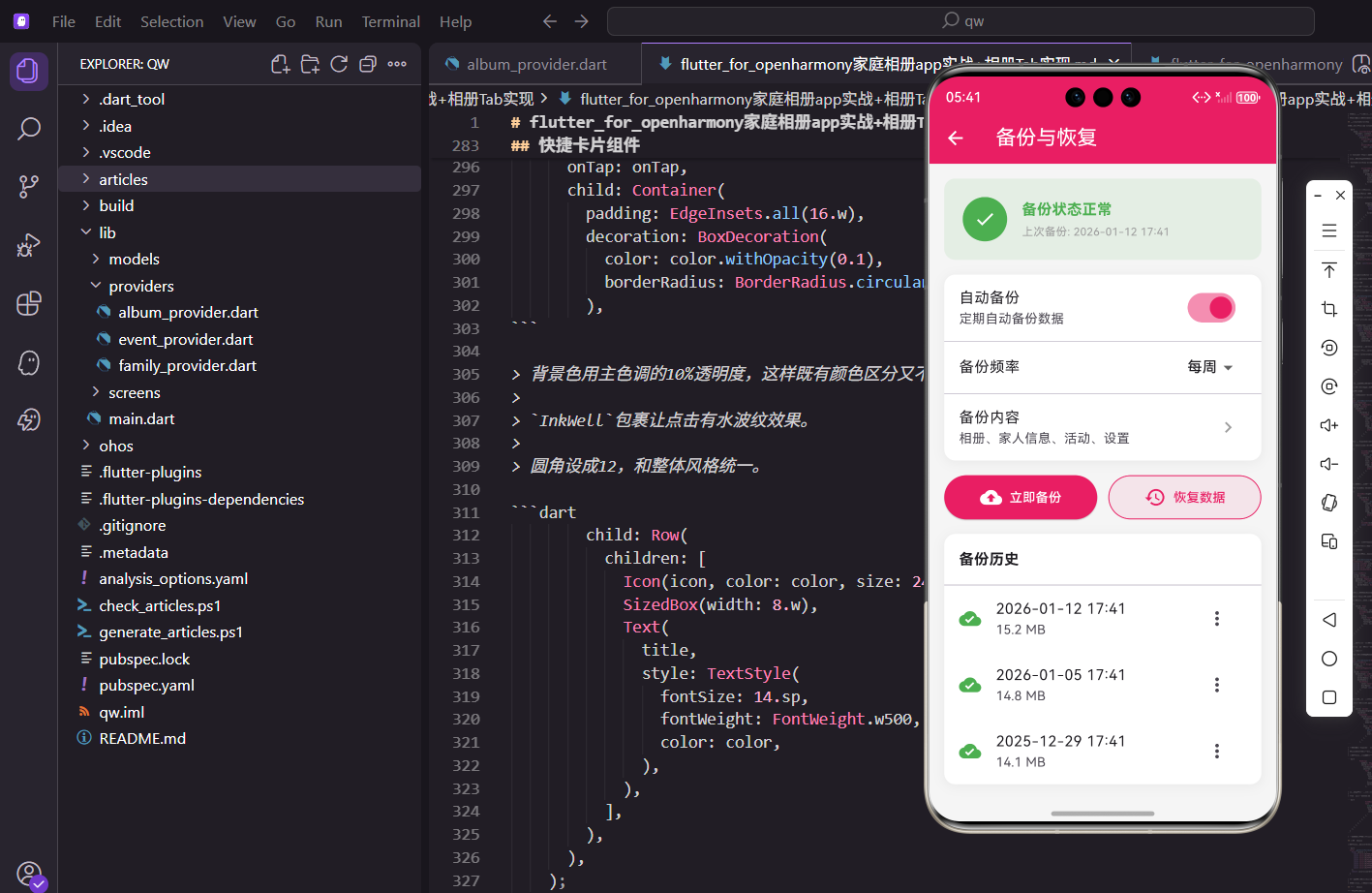
备份恢复功能是保护用户数据的重要手段。用户可以将照片、家人信息和回忆等数据备份到本地或云端,在需要时恢复数据。今天我们来实现这个功能。
设计思路
备份恢复页面分为两个部分:备份和恢复。备份部分显示上次备份时间和备份选项,恢复部分显示可用的备份列表。用户可以选择备份到本地或云端,也可以从备份中恢复数据。
创建页面结构
先搭建基本框架:
import 'package:flutter/material.dart';
import 'package:flutter_screenutil/flutter_screenutil.dart';
import 'package:provider/provider.dart';
import 'package:intl/intl.dart';
import '../providers/settings_provider.dart';
class BackupScreen extends StatefulWidget {
const BackupScreen({super.key});
State<BackupScreen> createState() => _BackupScreenState();
}
class _BackupScreenState extends State<BackupScreen> {
bool _isBackingUp = false;
bool _isRestoring = false;
double _backupProgress = 0;
double _restoreProgress = 0;
Widget build(BuildContext context) {
return Scaffold(
appBar: AppBar(
title: const Text('备份与恢复'),
elevation: 0,
),
body: Consumer<SettingsProvider>(
builder: (context, settings, _) {
return ListView(
padding: EdgeInsets.all(16.w),
children: [
_buildBackupSection(settings),
SizedBox(height: 24.h),
_buildRestoreSection(settings),
SizedBox(height: 24.h),
_buildAutoBackupSection(settings),
SizedBox(height: 24.h),
_buildBackupHistorySection(settings),
],
);
},
),
);
}
}
用StatefulWidget管理备份和恢复的进度状态。页面分为备份、恢复、自动备份和备份历史四个部分。
备份部分
显示备份选项和上次备份时间:
Widget _buildBackupSection(SettingsProvider settings) {
  return Container(
    padding: EdgeInsets.all(16.w),
    decoration: BoxDecoration(
      color: Colors.white,
      borderRadius: BorderRadius.circular(16.r),
      boxShadow: [
        BoxShadow(
          color: Colors.black.withOpacity(0.05),
          blurRadius: 10,
          offset: const Offset(0, 2),
        ),
      ],
    ),
    child: Column(
      crossAxisAlignment: CrossAxisAlignment.start,
      children: [
        Row(
          children: [
            Container(
              padding: EdgeInsets.all(10.w),
              decoration: BoxDecoration(
                color: const Color(0xFF2196F3).withOpacity(0.1),
                borderRadius: BorderRadius.circular(12.r),
              ),
              child: const Icon(
                Icons.backup,
                color: Color(0xFF2196F3),
                size: 24,
              ),
            ),
            SizedBox(width: 12.w),
            Expanded(
              child: Column(
                crossAxisAlignment: CrossAxisAlignment.start,
                children: [
                  Text(
                    '备份数据',
                    style: TextStyle(
                      fontSize: 18.sp,
                      fontWeight: FontWeight.bold,
                      color: Colors.black87,
                    ),
                  ),
                  SizedBox(height: 4.h),
                  Text(
                    settings.lastBackupTime != null
                        ? '上次备份:${DateFormat('yyyy-MM-dd HH:mm').format(settings.lastBackupTime!)}'
                        : '还没有备份过',
                    style: TextStyle(
                      fontSize: 13.sp,
                      color: Colors.grey[600],
                    ),
                  ),
                ],
              ),
            ),
          ],
        ),
        SizedBox(height: 16.h),
        if (_isBackingUp) ...[
          LinearProgressIndicator(
            value: _backupProgress,
            backgroundColor: Colors.grey[200],
            valueColor: const AlwaysStoppedAnimation<Color>(
              Color(0xFF2196F3),
            ),
          ),
          SizedBox(height: 8.h),
          Text(
            '正在备份... ${(_backupProgress * 100).toInt()}%',
            style: TextStyle(
              fontSize: 13.sp,
              color: Colors.grey[600],
            ),
          ),
        ] else ...[
          Row(
            children: [
              Expanded(
                child: OutlinedButton.icon(
                  onPressed: () => _backupToLocal(),
                  icon: const Icon(Icons.folder),
                  label: const Text('本地备份'),
                  style: OutlinedButton.styleFrom(
                    foregroundColor: const Color(0xFF2196F3),
                    side: const BorderSide(color: Color(0xFF2196F3)),
                    padding: EdgeInsets.symmetric(vertical: 12.h),
                    shape: RoundedRectangleBorder(
                      borderRadius: BorderRadius.circular(12.r),
                    ),
                  ),
                ),
              ),
              SizedBox(width: 12.w),
              Expanded(
                child: ElevatedButton.icon(
                  onPressed: () => _backupToCloud(),
                  icon: const Icon(Icons.cloud_upload),
                  label: const Text('云端备份'),
                  style: ElevatedButton.styleFrom(
                    backgroundColor: const Color(0xFF2196F3),
                    padding: EdgeInsets.symmetric(vertical: 12.h),
                    shape: RoundedRectangleBorder(
                      borderRadius: BorderRadius.circular(12.r),
                    ),
                  ),
                ),
              ),
            ],
          ),
        ],
      ],
    ),
  );
}
备份部分显示上次备份时间,提供本地备份和云端备份两个选项。备份进行中显示进度条。
恢复部分
显示恢复选项:
Widget _buildRestoreSection(SettingsProvider settings) {
  return Container(
    padding: EdgeInsets.all(16.w),
    decoration: BoxDecoration(
      color: Colors.white,
      borderRadius: BorderRadius.circular(16.r),
      boxShadow: [
        BoxShadow(
          color: Colors.black.withOpacity(0.05),
          blurRadius: 10,
          offset: const Offset(0, 2),
        ),
      ],
    ),
    child: Column(
      crossAxisAlignment: CrossAxisAlignment.start,
      children: [
        Row(
          children: [
            Container(
              padding: EdgeInsets.all(10.w),
              decoration: BoxDecoration(
                color: const Color(0xFF4CAF50).withOpacity(0.1),
                borderRadius: BorderRadius.circular(12.r),
              ),
              child: const Icon(
                Icons.restore,
                color: Color(0xFF4CAF50),
                size: 24,
              ),
            ),
            SizedBox(width: 12.w),
            Expanded(
              child: Column(
                crossAxisAlignment: CrossAxisAlignment.start,
                children: [
                  Text(
                    '恢复数据',
                    style: TextStyle(
                      fontSize: 18.sp,
                      fontWeight: FontWeight.bold,
                      color: Colors.black87,
                    ),
                  ),
                  SizedBox(height: 4.h),
                  Text(
                    '从备份中恢复您的数据',
                    style: TextStyle(
                      fontSize: 13.sp,
                      color: Colors.grey[600],
                    ),
                  ),
                ],
              ),
            ),
          ],
        ),
        SizedBox(height: 16.h),
        if (_isRestoring) ...[
          LinearProgressIndicator(
            value: _restoreProgress,
            backgroundColor: Colors.grey[200],
            valueColor: const AlwaysStoppedAnimation<Color>(
              Color(0xFF4CAF50),
            ),
          ),
          SizedBox(height: 8.h),
          Text(
            '正在恢复... ${(_restoreProgress * 100).toInt()}%',
            style: TextStyle(
              fontSize: 13.sp,
              color: Colors.grey[600],
            ),
          ),
        ] else ...[
          Row(
            children: [
              Expanded(
                child: OutlinedButton.icon(
                  onPressed: () => _restoreFromLocal(),
                  icon: const Icon(Icons.folder_open),
                  label: const Text('本地恢复'),
                  style: OutlinedButton.styleFrom(
                    foregroundColor: const Color(0xFF4CAF50),
                    side: const BorderSide(color: Color(0xFF4CAF50)),
                    padding: EdgeInsets.symmetric(vertical: 12.h),
                    shape: RoundedRectangleBorder(
                      borderRadius: BorderRadius.circular(12.r),
                    ),
                  ),
                ),
              ),
              SizedBox(width: 12.w),
              Expanded(
                child: ElevatedButton.icon(
                  onPressed: () => _restoreFromCloud(),
                  icon: const Icon(Icons.cloud_download),
                  label: const Text('云端恢复'),
                  style: ElevatedButton.styleFrom(
                    backgroundColor: const Color(0xFF4CAF50),
                    padding: EdgeInsets.symmetric(vertical: 12.h),
                    shape: RoundedRectangleBorder(
                      borderRadius: BorderRadius.circular(12.r),
                    ),
                  ),
                ),
              ),
            ],
          ),
        ],
      ],
    ),
  );
}
恢复部分和备份部分类似,提供本地恢复和云端恢复两个选项。恢复进行中显示进度条。
自动备份设置
让用户配置自动备份:
Widget _buildAutoBackupSection(SettingsProvider settings) {
  return Container(
    padding: EdgeInsets.all(16.w),
    decoration: BoxDecoration(
      color: Colors.white,
      borderRadius: BorderRadius.circular(16.r),
      boxShadow: [
        BoxShadow(
          color: Colors.black.withOpacity(0.05),
          blurRadius: 10,
          offset: const Offset(0, 2),
        ),
      ],
    ),
    child: Column(
      crossAxisAlignment: CrossAxisAlignment.start,
      children: [
        Row(
          children: [
            Container(
              padding: EdgeInsets.all(10.w),
              decoration: BoxDecoration(
                color: const Color(0xFFFF9800).withOpacity(0.1),
                borderRadius: BorderRadius.circular(12.r),
              ),
              child: const Icon(
                Icons.schedule,
                color: Color(0xFFFF9800),
                size: 24,
              ),
            ),
            SizedBox(width: 12.w),
            Text(
              '自动备份',
              style: TextStyle(
                fontSize: 18.sp,
                fontWeight: FontWeight.bold,
                color: Colors.black87,
              ),
            ),
          ],
        ),
        SizedBox(height: 16.h),
        SwitchListTile(
          title: const Text('启用自动备份'),
          subtitle: const Text('每天自动备份数据到云端'),
          value: settings.autoBackup,
          onChanged: (value) {
            settings.setAutoBackup(value);
          },
          activeColor: const Color(0xFFE91E63),
          contentPadding: EdgeInsets.zero,
        ),
        if (settings.autoBackup) ...[
          const Divider(),
          ListTile(
            title: const Text('备份频率'),
            subtitle: Text(_getBackupFrequencyText(settings.backupFrequency)),
            trailing: const Icon(Icons.chevron_right),
            contentPadding: EdgeInsets.zero,
            onTap: () => _showFrequencyDialog(settings),
          ),
          ListTile(
            title: const Text('仅在WiFi下备份'),
            trailing: Switch(
              value: settings.backupOnlyWifi,
              onChanged: (value) {
                settings.setBackupOnlyWifi(value);
              },
              activeColor: const Color(0xFFE91E63),
            ),
            contentPadding: EdgeInsets.zero,
          ),
        ],
      ],
    ),
  );
}

String _getBackupFrequencyText(String frequency) {
  switch (frequency) {
    case 'daily':
      return '每天';
    case 'weekly':
      return '每周';
    case 'monthly':
      return '每月';
    default:
      return '每天';
  }
}
自动备份设置包括开关、备份频率和WiFi限制。开启自动备份后才显示详细设置。
备份频率对话框
让用户选择备份频率:
void _showFrequencyDialog(SettingsProvider settings) {
  showDialog(
    context: context,
    builder: (dialogContext) => AlertDialog(
      title: const Text('备份频率'),
      content: Column(
        mainAxisSize: MainAxisSize.min,
        children: [
          RadioListTile<String>(
            title: const Text('每天'),
            value: 'daily',
            groupValue: settings.backupFrequency,
            onChanged: (value) {
              settings.setBackupFrequency(value!);
              Navigator.pop(dialogContext);
            },
            activeColor: const Color(0xFFE91E63),
          ),
          RadioListTile<String>(
            title: const Text('每周'),
            value: 'weekly',
            groupValue: settings.backupFrequency,
            onChanged: (value) {
              settings.setBackupFrequency(value!);
              Navigator.pop(dialogContext);
            },
            activeColor: const Color(0xFFE91E63),
          ),
          RadioListTile<String>(
            title: const Text('每月'),
            value: 'monthly',
            groupValue: settings.backupFrequency,
            onChanged: (value) {
              settings.setBackupFrequency(value!);
              Navigator.pop(dialogContext);
            },
            activeColor: const Color(0xFFE91E63),
          ),
        ],
      ),
      shape: RoundedRectangleBorder(
        borderRadius: BorderRadius.circular(16.r),
      ),
    ),
  );
}
频率对话框用RadioListTile实现单选,选择后立即应用并关闭对话框。
备份历史列表
展示历史备份记录:
Widget _buildBackupHistorySection(SettingsProvider settings) {
  final backupHistory = settings.backupHistory;

  return Container(
    padding: EdgeInsets.all(16.w),
    decoration: BoxDecoration(
      color: Colors.white,
      borderRadius: BorderRadius.circular(16.r),
      boxShadow: [
        BoxShadow(
          color: Colors.black.withOpacity(0.05),
          blurRadius: 10,
          offset: const Offset(0, 2),
        ),
      ],
    ),
    child: Column(
      crossAxisAlignment: CrossAxisAlignment.start,
      children: [
        Row(
          children: [
            Container(
              padding: EdgeInsets.all(10.w),
              decoration: BoxDecoration(
                color: const Color(0xFF9C27B0).withOpacity(0.1),
                borderRadius: BorderRadius.circular(12.r),
              ),
              child: const Icon(
                Icons.history,
                color: Color(0xFF9C27B0),
                size: 24,
              ),
            ),
            SizedBox(width: 12.w),
            Text(
              '备份历史',
              style: TextStyle(
                fontSize: 18.sp,
                fontWeight: FontWeight.bold,
                color: Colors.black87,
              ),
            ),
          ],
        ),
        SizedBox(height: 16.h),
        if (backupHistory.isEmpty)
          Center(
            child: Padding(
              padding: EdgeInsets.symmetric(vertical: 24.h),
              child: Column(
                children: [
                  Icon(
                    Icons.cloud_off,
                    size: 48,
                    color: Colors.grey[400],
                  ),
                  SizedBox(height: 8.h),
                  Text(
                    '暂无备份记录',
                    style: TextStyle(
                      fontSize: 14.sp,
                      color: Colors.grey[500],
                    ),
                  ),
                ],
              ),
            ),
          )
        else
          ...backupHistory.map((backup) => _buildBackupItem(backup)),
      ],
    ),
  );
}
备份历史部分显示所有历史备份记录。如果没有备份记录,显示空状态提示。
备份记录项
每条备份记录的展示:
Widget _buildBackupItem(Map<String, dynamic> backup) {
  final isCloud = backup['type'] == 'cloud';
  final time = DateTime.parse(backup['time']);
  final size = backup['size'] as int;

  return Container(
    margin: EdgeInsets.only(bottom: 12.h),
    padding: EdgeInsets.all(12.w),
    decoration: BoxDecoration(
      color: Colors.grey[50],
      borderRadius: BorderRadius.circular(12.r),
      border: Border.all(color: Colors.grey[200]!),
    ),
    child: Row(
      children: [
        Container(
          padding: EdgeInsets.all(8.w),
          decoration: BoxDecoration(
            color: isCloud
                ? const Color(0xFF2196F3).withOpacity(0.1)
                : const Color(0xFF4CAF50).withOpacity(0.1),
            borderRadius: BorderRadius.circular(8.r),
          ),
          child: Icon(
            isCloud ? Icons.cloud : Icons.folder,
            color: isCloud
                ? const Color(0xFF2196F3)
                : const Color(0xFF4CAF50),
            size: 20,
          ),
        ),
        SizedBox(width: 12.w),
        Expanded(
          child: Column(
            crossAxisAlignment: CrossAxisAlignment.start,
            children: [
              Text(
                isCloud ? '云端备份' : '本地备份',
                style: TextStyle(
                  fontSize: 14.sp,
                  fontWeight: FontWeight.w500,
                  color: Colors.black87,
                ),
              ),
              SizedBox(height: 4.h),
              Text(
                DateFormat('yyyy-MM-dd HH:mm').format(time),
                style: TextStyle(
                  fontSize: 12.sp,
                  color: Colors.grey[600],
                ),
              ),
            ],
          ),
        ),
        Column(
          crossAxisAlignment: CrossAxisAlignment.end,
          children: [
            Text(
              _formatSize(size),
              style: TextStyle(
                fontSize: 13.sp,
                color: Colors.grey[700],
              ),
            ),
            SizedBox(height: 4.h),
            GestureDetector(
              onTap: () => _deleteBackup(backup),
              child: Text(
                '删除',
                style: TextStyle(
                  fontSize: 12.sp,
                  color: Colors.red[400],
                ),
              ),
            ),
          ],
        ),
      ],
    ),
  );
}

String _formatSize(int bytes) {
  if (bytes < 1024) return '$bytes B';
  if (bytes < 1024 * 1024) return '${(bytes / 1024).toStringAsFixed(1)} KB';
  if (bytes < 1024 * 1024 * 1024) {
    return '${(bytes / (1024 * 1024)).toStringAsFixed(1)} MB';
  }
  return '${(bytes / (1024 * 1024 * 1024)).toStringAsFixed(1)} GB';
}
备份记录项显示备份类型、时间和大小。云端备份和本地备份用不同颜色区分,方便用户识别。
本地备份实现
执行本地备份操作:
Future<void> _backupToLocal() async {
  setState(() {
    _isBackingUp = true;
    _backupProgress = 0;
  });

  try {
    for (int i = 0; i <= 100; i += 10) {
      await Future.delayed(const Duration(milliseconds: 200));
      setState(() {
        _backupProgress = i / 100;
      });
    }

    if (mounted) {
      final settings = context.read<SettingsProvider>();
      settings.addBackupRecord({
        'type': 'local',
        'time': DateTime.now().toIso8601String(),
        'size': 1024 * 1024 * 50,
      });
      settings.setLastBackupTime(DateTime.now());

      ScaffoldMessenger.of(context).showSnackBar(
        SnackBar(
          content: const Text('本地备份完成'),
          backgroundColor: const Color(0xFF4CAF50),
          behavior: SnackBarBehavior.floating,
          shape: RoundedRectangleBorder(
            borderRadius: BorderRadius.circular(10.r),
          ),
        ),
      );
    }
  } catch (e) {
    if (mounted) {
      ScaffoldMessenger.of(context).showSnackBar(
        SnackBar(
          content: Text('备份失败:$e'),
          backgroundColor: Colors.red,
          behavior: SnackBarBehavior.floating,
        ),
      );
    }
  } finally {
    if (mounted) {
      setState(() {
        _isBackingUp = false;
      });
    }
  }
}
本地备份模拟进度更新,完成后记录备份信息。实际项目中需要调用文件系统API保存数据。
云端备份实现
执行云端备份操作:
Future<void> _backupToCloud() async {
  setState(() {
    _isBackingUp = true;
    _backupProgress = 0;
  });

  try {
    for (int i = 0; i <= 100; i += 5) {
      await Future.delayed(const Duration(milliseconds: 150));
      setState(() {
        _backupProgress = i / 100;
      });
    }

    if (mounted) {
      final settings = context.read<SettingsProvider>();
      settings.addBackupRecord({
        'type': 'cloud',
        'time': DateTime.now().toIso8601String(),
        'size': 1024 * 1024 * 48,
      });
      settings.setLastBackupTime(DateTime.now());

      ScaffoldMessenger.of(context).showSnackBar(
        SnackBar(
          content: const Text('云端备份完成'),
          backgroundColor: const Color(0xFF2196F3),
          behavior: SnackBarBehavior.floating,
          shape: RoundedRectangleBorder(
            borderRadius: BorderRadius.circular(10.r),
          ),
        ),
      );
    }
  } catch (e) {
    if (mounted) {
      ScaffoldMessenger.of(context).showSnackBar(
        SnackBar(
          content: Text('备份失败:$e'),
          backgroundColor: Colors.red,
          behavior: SnackBarBehavior.floating,
        ),
      );
    }
  } finally {
    if (mounted) {
      setState(() {
        _isBackingUp = false;
      });
    }
  }
}
云端备份和本地备份类似,但进度更新更频繁。实际项目中需要调用云存储API上传数据。
本地恢复实现
从本地备份恢复数据:
Future<void> _restoreFromLocal() async {
  final confirmed = await showDialog<bool>(
    context: context,
    builder: (dialogContext) => AlertDialog(
      title: const Text('确认恢复'),
      content: const Text('恢复数据将覆盖当前数据,确定要继续吗?'),
      shape: RoundedRectangleBorder(
        borderRadius: BorderRadius.circular(16.r),
      ),
      actions: [
        TextButton(
          onPressed: () => Navigator.pop(dialogContext, false),
          child: const Text('取消'),
        ),
        ElevatedButton(
          onPressed: () => Navigator.pop(dialogContext, true),
          style: ElevatedButton.styleFrom(
            backgroundColor: const Color(0xFF4CAF50),
          ),
          child: const Text('确认恢复'),
        ),
      ],
    ),
  );

  if (confirmed != true) return;

  setState(() {
    _isRestoring = true;
    _restoreProgress = 0;
  });

  try {
    for (int i = 0; i <= 100; i += 8) {
      await Future.delayed(const Duration(milliseconds: 180));
      setState(() {
        _restoreProgress = i / 100;
      });
    }

    if (mounted) {
      ScaffoldMessenger.of(context).showSnackBar(
        SnackBar(
          content: const Text('本地恢复完成'),
          backgroundColor: const Color(0xFF4CAF50),
          behavior: SnackBarBehavior.floating,
          shape: RoundedRectangleBorder(
            borderRadius: BorderRadius.circular(10.r),
          ),
        ),
      );
    }
  } catch (e) {
    if (mounted) {
      ScaffoldMessenger.of(context).showSnackBar(
        SnackBar(
          content: Text('恢复失败:$e'),
          backgroundColor: Colors.red,
          behavior: SnackBarBehavior.floating,
        ),
      );
    }
  } finally {
    if (mounted) {
      setState(() {
        _isRestoring = false;
      });
    }
  }
}
恢复前先弹出确认对话框,防止用户误操作。确认后开始恢复并显示进度。
云端恢复实现
从云端备份恢复数据:
Future<void> _restoreFromCloud() async {
  final confirmed = await showDialog<bool>(
    context: context,
    builder: (dialogContext) => AlertDialog(
      title: const Text('确认恢复'),
      content: const Text('恢复数据将覆盖当前数据,确定要继续吗?'),
      shape: RoundedRectangleBorder(
        borderRadius: BorderRadius.circular(16.r),
      ),
      actions: [
        TextButton(
          onPressed: () => Navigator.pop(dialogContext, false),
          child: const Text('取消'),
        ),
        ElevatedButton(
          onPressed: () => Navigator.pop(dialogContext, true),
          style: ElevatedButton.styleFrom(
            backgroundColor: const Color(0xFF2196F3),
          ),
          child: const Text('确认恢复'),
        ),
      ],
    ),
  );

  if (confirmed != true) return;

  setState(() {
    _isRestoring = true;
    _restoreProgress = 0;
  });

  try {
    for (int i = 0; i <= 100; i += 6) {
      await Future.delayed(const Duration(milliseconds: 160));
      setState(() {
        _restoreProgress = i / 100;
      });
    }

    if (mounted) {
      ScaffoldMessenger.of(context).showSnackBar(
        SnackBar(
          content: const Text('云端恢复完成'),
          backgroundColor: const Color(0xFF2196F3),
          behavior: SnackBarBehavior.floating,
          shape: RoundedRectangleBorder(
            borderRadius: BorderRadius.circular(10.r),
          ),
        ),
      );
    }
  } catch (e) {
    if (mounted) {
      ScaffoldMessenger.of(context).showSnackBar(
        SnackBar(
          content: Text('恢复失败:$e'),
          backgroundColor: Colors.red,
          behavior: SnackBarBehavior.floating,
        ),
      );
    }
  } finally {
    if (mounted) {
      setState(() {
        _isRestoring = false;
      });
    }
  }
}
云端恢复流程和本地恢复一致,都需要用户确认。实际项目中需要从云存储下载数据。
删除备份记录
删除指定的备份记录:
Future<void> _deleteBackup(Map<String, dynamic> backup) async {
  final confirmed = await showDialog<bool>(
    context: context,
    builder: (dialogContext) => AlertDialog(
      title: const Text('删除备份'),
      content: const Text('确定要删除这条备份记录吗?删除后无法恢复。'),
      shape: RoundedRectangleBorder(
        borderRadius: BorderRadius.circular(16.r),
      ),
      actions: [
        TextButton(
          onPressed: () => Navigator.pop(dialogContext, false),
          child: const Text('取消'),
        ),
        ElevatedButton(
          onPressed: () => Navigator.pop(dialogContext, true),
          style: ElevatedButton.styleFrom(
            backgroundColor: Colors.red,
          ),
          child: const Text('删除'),
        ),
      ],
    ),
  );

  if (confirmed == true && mounted) {
    final settings = context.read<SettingsProvider>();
    settings.removeBackupRecord(backup);

    ScaffoldMessenger.of(context).showSnackBar(
      SnackBar(
        content: const Text('备份已删除'),
        behavior: SnackBarBehavior.floating,
        shape: RoundedRectangleBorder(
          borderRadius: BorderRadius.circular(10.r),
        ),
      ),
    );
  }
}
删除备份前需要用户确认,防止误删重要数据。删除后显示提示信息。
小结
备份恢复功能实现了数据保护的核心需求。通过本地和云端两种备份方式,用户可以灵活选择。自动备份功能减少了手动操作的麻烦,备份历史让用户清楚了解数据状态。进度条和确认对话框提升了用户体验,让操作过程更加透明可控。
欢迎加入开源鸿蒙跨平台社区:https://openharmonycrossplatform.csdn.net
更多推荐
 20
20 0
0- 0


 已为社区贡献1条内容

所有评论(0)