
分布式授权认证:Spring Cloud Security OAuth2(二)
网关依赖<dependency><groupId>org.springframework.cloud</groupId><artifactId>spring-cloud-starter-security</artifactId></dependency&g...
·
网关
依赖
		<dependency>
            <groupId>org.springframework.cloud</groupId>
            <artifactId>spring-cloud-starter-security</artifactId>
        </dependency>

        <dependency>
            <groupId>org.springframework.cloud</groupId>
            <artifactId>spring-cloud-starter-oauth2</artifactId>
        </dependency>
util

- EncryptUtil:给http进行字符编码的工具类
public class EncryptUtil {
    private static final Logger logger = LoggerFactory.getLogger(EncryptUtil.class);

    public static String encodeBase64(byte[] bytes){
        String encoded = Base64.getEncoder().encodeToString(bytes);
        return encoded;
    }

    public static byte[]  decodeBase64(String str){
        byte[] bytes = null;
        bytes = Base64.getDecoder().decode(str);
        return bytes;
    }

    public static String encodeUTF8StringBase64(String str){
        String encoded = null;
        try {
            encoded = Base64.getEncoder().encodeToString(str.getBytes("utf-8"));
        } catch (UnsupportedEncodingException e) {
            logger.warn("不支持的编码格式",e);
        }
        return encoded;

    }

    public static String  decodeUTF8StringBase64(String str){
        String decoded = null;
        byte[] bytes = Base64.getDecoder().decode(str);
        try {
            decoded = new String(bytes,"utf-8");
        }catch(UnsupportedEncodingException e){
            logger.warn("不支持的编码格式",e);
        }
        return decoded;
    }

    public static String encodeURL(String url) {
    	String encoded = null;
		try {
			encoded =  URLEncoder.encode(url, "utf-8");
		} catch (UnsupportedEncodingException e) {
			logger.warn("URLEncode失败", e);
		}
		return encoded;
	}


	public static String decodeURL(String url) {
    	String decoded = null;
		try {
			decoded = URLDecoder.decode(url, "utf-8");
		} catch (UnsupportedEncodingException e) {
			logger.warn("URLDecode失败", e);
		}
		return decoded;
	}

    public static void main(String [] args){
        String str = "abcd{'a':'b'}";
        String encoded = EncryptUtil.encodeUTF8StringBase64(str);
        String decoded = EncryptUtil.decodeUTF8StringBase64(encoded);
        System.out.println(str);
        System.out.println(encoded);
        System.out.println(decoded);

        String url = "== wo";
        String urlEncoded = EncryptUtil.encodeURL(url);
        String urlDecoded = EncryptUtil.decodeURL(urlEncoded);

        System.out.println(url);
        System.out.println(urlEncoded);
        System.out.println(urlDecoded);
    }


}
filter

- AuthFilter:解析token 把解析出来的信息放在请求头 下游服务器可以直接使用
public class AuthFilter extends ZuulFilter {

    @Override
    public boolean shouldFilter() {
        return true;
    }

    @Override
    public String filterType() {
        return "pre";
    }

    @Override
    public int filterOrder() {
        return 0;
    }

    @Override
    public Object run() throws ZuulException {
        RequestContext ctx = RequestContext.getCurrentContext();
        //从安全上下文中拿 到用户身份对象
        Authentication authentication = SecurityContextHolder.getContext().getAuthentication();
        if(!(authentication instanceof OAuth2Authentication)){
            return null;
        }
        OAuth2Authentication oAuth2Authentication = (OAuth2Authentication) authentication;
        Authentication userAuthentication = oAuth2Authentication.getUserAuthentication();
        //取出用户身份信息
        String principal = userAuthentication.getName();

        //取出用户权限
        List<String> authorities = new ArrayList<>();
        //从userAuthentication取出权限,放在authorities
        userAuthentication.getAuthorities().stream().forEach(c->authorities.add(((GrantedAuthority) c).getAuthority()));

        OAuth2Request oAuth2Request = oAuth2Authentication.getOAuth2Request();
        Map<String, String> requestParameters = oAuth2Request.getRequestParameters();
        Map<String,Object> jsonToken = new HashMap<>(requestParameters);
        if(userAuthentication!=null){
            jsonToken.put("principal",principal);
            jsonToken.put("authorities",authorities);
        }

        //把身份信息和权限信息放在json中,加入http的header中,转发给微服务
        ctx.addZuulRequestHeader("json-token", EncryptUtil.encodeUTF8StringBase64(JSON.toJSONString(jsonToken)));

        return null;
    }
}
config
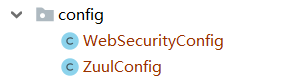
- WebSecurityConfig:Spring Security 拦截路径配置
@Configuration
public class WebSecurityConfig extends WebSecurityConfigurerAdapter {

    @Override
    protected void configure(HttpSecurity http) throws Exception {

        http
                .authorizeRequests()
                .antMatchers("/**").permitAll()
                .and().csrf().disable();
    }
}
@Configuration
public class ZuulConfig {

    @Bean
    //刚才写的AuthFilter
    public AuthFilter preFileter() {
        return new AuthFilter();
    }

	/**
	 * 允许跨域
	 */
    @Bean
    public FilterRegistrationBean corsFilter() {
        final UrlBasedCorsConfigurationSource source = new UrlBasedCorsConfigurationSource();
        final CorsConfiguration config = new CorsConfiguration();
        config.setAllowCredentials(true);
        config.addAllowedOrigin("*");
        config.addAllowedHeader("*");
        config.addAllowedMethod("*");
        config.setMaxAge(18000L);
        source.registerCorsConfiguration("/**", config);
        CorsFilter corsFilter = new CorsFilter(source);
        FilterRegistrationBean bean = new FilterRegistrationBean(corsFilter);
        bean.setOrder(Ordered.HIGHEST_PRECEDENCE);
        return bean;
    }
}
资源服务
依赖
		<dependency>
            <groupId>org.springframework.cloud</groupId>
            <artifactId>spring-cloud-starter-security</artifactId>
        </dependency>

        <dependency>
            <groupId>org.springframework.cloud</groupId>
            <artifactId>spring-cloud-starter-oauth2</artifactId>
        </dependency>
util

- EncryptUtil:encrypt加密解密的工具类
public class EncryptUtil {
    private static final Logger logger = LoggerFactory.getLogger(EncryptUtil.class);

    public static String encodeBase64(byte[] bytes){
        String encoded = Base64.getEncoder().encodeToString(bytes);
        return encoded;
    }

    public static byte[]  decodeBase64(String str){
        byte[] bytes = null;
        bytes = Base64.getDecoder().decode(str);
        return bytes;
    }

    public static String encodeUTF8StringBase64(String str){
        String encoded = null;
        try {
            encoded = Base64.getEncoder().encodeToString(str.getBytes("utf-8"));
        } catch (UnsupportedEncodingException e) {
            logger.warn("不支持的编码格式",e);
        }
        return encoded;

    }

    public static String  decodeUTF8StringBase64(String str){
        String decoded = null;
        byte[] bytes = Base64.getDecoder().decode(str);
        try {
            decoded = new String(bytes,"utf-8");
        }catch(UnsupportedEncodingException e){
            logger.warn("不支持的编码格式",e);
        }
        return decoded;
    }

    public static String encodeURL(String url) {
    	String encoded = null;
		try {
			encoded =  URLEncoder.encode(url, "utf-8");
		} catch (UnsupportedEncodingException e) {
			logger.warn("URLEncode失败", e);
		}
		return encoded;
	}


	public static String decodeURL(String url) {
    	String decoded = null;
		try {
			decoded = URLDecoder.decode(url, "utf-8");
		} catch (UnsupportedEncodingException e) {
			logger.warn("URLDecode失败", e);
		}
		return decoded;
	}

    public static void main(String [] args){
        String str = "abcd{'a':'b'}";
        String encoded = EncryptUtil.encodeUTF8StringBase64(str);
        String decoded = EncryptUtil.decodeUTF8StringBase64(encoded);
        System.out.println(str);
        System.out.println(encoded);
        System.out.println(decoded);

        String url = "== wo";
        String urlEncoded = EncryptUtil.encodeURL(url);
        String urlDecoded = EncryptUtil.decodeURL(urlEncoded);

        System.out.println(url);
        System.out.println(urlEncoded);
        System.out.println(urlDecoded);
    }


}
filter

- TokenAuthenticationFilter:从网关放入的token信息解析用户信息,并把权限设置给UsernamePasswordAuthenticationToken,这样才可以通过验证 并获得权限
@Component
public class TokenAuthenticationFilter extends OncePerRequestFilter {


    /**
     * 登陆后验证是否登陆的拦截器 并且从token的载荷中获得权限
     */
    @Override
    protected void doFilterInternal(HttpServletRequest httpServletRequest, HttpServletResponse httpServletResponse, FilterChain filterChain) throws ServletException, IOException {
            //解析出头中的token
        String token = httpServletRequest.getHeader("json-token");
        if(token!=null){
            String json = EncryptUtil.decodeUTF8StringBase64(token);
            //将token转成json对象
            JSONObject jsonObject = JSON.parseObject(json);
            UserDTO userDTO = JSON.parseObject(jsonObject.getString("principal"), UserDTO.class);

            //用户权限
            JSONArray authoritiesArray = jsonObject.getJSONArray("authorities");
            String[] authorities = authoritiesArray.toArray(new String[authoritiesArray.size()]);

            //将用户信息和权限填充 到用户身份token对象中(必须填权限 不然通不过验证)
            UsernamePasswordAuthenticationToken authenticationToken
                    = new UsernamePasswordAuthenticationToken(userDTO,null, AuthorityUtils.createAuthorityList(authorities));

            authenticationToken.setDetails(new WebAuthenticationDetailsSource().buildDetails(httpServletRequest));
            //将authenticationToken填充到安全上下文
            SecurityContextHolder.getContext().setAuthentication(authenticationToken);
        }
        filterChain.doFilter(httpServletRequest,httpServletResponse);
    }
}
config
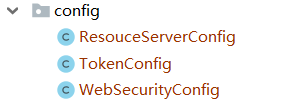
- TokenConfig:token的相关配置 因为token和权限挂钩
@Configuration
public class TokenConfig {

	//对称密钥 要和授权服务的相同 不然通不过验证
    private String SIGNING_KEY = "uaa123";

    @Bean
    public TokenStore tokenStore() {
        //JWT令牌存储方案
        return new JwtTokenStore(accessTokenConverter());
    }

    @Bean
    public JwtAccessTokenConverter accessTokenConverter() {
        JwtAccessTokenConverter converter = new JwtAccessTokenConverter();
        converter.setSigningKey(SIGNING_KEY); //对称秘钥,资源服务器使用该秘钥来验证
        return converter;
    }
}
- WebSecurityConfig
@Configuration
//开启注解
@EnableGlobalMethodSecurity(securedEnabled = true,prePostEnabled = true)
public class WebSecurityConfig extends WebSecurityConfigurerAdapter {


    //安全拦截机制(最重要)
    @Override
    protected void configure(HttpSecurity http) throws Exception {
        http.csrf().disable()
                .authorizeRequests()
//                .antMatchers("/r/r1").hasAuthority("p2")
//                .antMatchers("/r/r2").hasAuthority("p2")
                .antMatchers("/r/**").authenticated() //所有/r/**的请求必须认证通过
                .anyRequest().permitAll()//除了/r/**,其它的请求可以访问
        ;


    }
}
- ResouceServerConfig:静态资源权限配置
@Configuration
//开启静态资源服务
@EnableResourceServer
public class ResouceServerConfig extends ResourceServerConfigurerAdapter {

	//静态资源id 对应oauth_client_details表中填写的resource_ids
    public static final String RESOURCE_ID = "res1";

    @Autowired
    TokenStore tokenStore;

    @Override
    public void configure(ResourceServerSecurityConfigurer resources) {
        resources.resourceId(RESOURCE_ID)//资源 id
                .tokenStore(tokenStore)
                .stateless(true);
    }

    @Override
    public void configure(HttpSecurity http) throws Exception {

        http
                .authorizeRequests()
                //Scope 客户端必须有的访问权限 不是指用户的权限
                .antMatchers("/**").access("#oauth2.hasScope('ROLE_ADMIN')")
                .and().csrf().disable()
                .sessionManagement()
				//禁用session
				.sessionCreationPolicy(SessionCreationPolicy.STATELESS);
    }

}
controller

- ProductController(测试)
@RestController
@RequestMapping("/product")
public class ProductController {

    @GetMapping("/findAll")
    public String findAll(){
        return "产品列表查询成功!";
    }

	@GetMapping(value = "/r1")
    @PreAuthorize("hasAuthority('p1')")//拥有p1权限方可访问此url
    public String r1(){
        //获取用户身份信息
        UserDTO  userDTO = (UserDTO) SecurityContextHolder.getContext().getAuthentication().getPrincipal();
        return userDTO.getUsername()+"访问资源1";
    }
}
整合完毕! 下一篇进行Spring Cloud Security OAuth2 的几种模式的说明
更多推荐
 0
0 0
0- 0


 已为社区贡献1条内容

所有评论(0)